Anyone who can use a 1-nighter on this date, SUPER VERY NICE:
1-night SSR Studio 11/23 for $196/night or 34% under median
Anyone who can use a 1-nighter on this date, SUPER VERY NICE:
1-night SSR Studio 11/23 for $196/night or 34% under median
So, I’ve been very busy but still sneaking in play time on the couch each night trying to take this tables plugin through various settings.
I’m liking it very much, but it does have some aggravating idiosyncrasies.
For example: My scripts and data cruncher spreadsheet spit out .csv data files - which for the un-nerdy are just files that contain data fields separated by commas, usually with a line at the top defining the column names. A simple one might look like this:
Status, Start Date, Resort, Room, Nights, Price
Active, 1/5/2026, Old Key West, Studio, 4, 290
Past, 2/15/2026, Saratoga Springs, Studio, 2, 250
When I set up the tables plugin to import directly from the csv file I have shared in Dropbox - it imports everything nicely EXCEPT it keeps reversing the day and month in the dates!
So, in the data examples above, the table will show the first one starting on May 1st instead of Jan 5th, and it produces an error for the 2nd record because it can’t recognize a 15th month!
I went over the settings many times - I have everything set up for the date fields as mm/dd/yyyy and my data in the .csv file is completely fine.
If I create a manual table (as opposed to telling the plugin to automagically import the csv file) and then import the data uploading it by hand each time - it reads the data fields correctly.
| Harumph, I do not want to upload manually anymore, that has been annoying when using the current Caspio tool. |  |
 |
Crazily enough - if I set up a Google Sheet to import the shared csv file and THEN set up the tables plugin to automagically import from Sheets: WORKS FINE. |
I am not a fan of having to rely on sheets importing consistently since I know from my old Priceline scraping lookup sheet days that Google Sheets’ IMPORTDATA function works fine - until it decides not to. But for now, oh well. I’m going to start a ticket with the plugin’s support to see if the data format issue is a bug.
Anyway, this still isn’t my full vision, but I’m likely going to run with this current search engine design for now. (I’m also going to add on some optional tools that should help me keep it loading speedily and allow for some better presentation later.)
If I have time this weekend I will probably blow up my current install and start over with a fresh Wordpress and super basic theme, so that won’t be out there too long. (I installed this site last year when I was trying out a different tool that I really found difficult to work with and I want to start clean.) But at this time I am confident enough with the tables plugin that I can recreate the search engine reasonably quickly after I start over.
Once reinstalled I can transition away from the Caspio search engine and not have Touring Plans cover an extra month of charges and I can take some more time to work on my site’s overall design. I plan to add reference charts and other data to the mix to help people analyze what they are seeing.
OK I love the name, first of all. That is super awesome
But also, I like it!
I assume the color coding is telling me something?
Yes- I’m just fiddling with the settings so didn’t even attempt to write anything up.
But for now the colors:
(Whoops I borked those numbers below on reply, fixed now.)
Gray row: Listings that have “Past” status.
Problem with that one is: if it is a past listing AND falls into one of the other categories above, those seem to take precedence, so will appear green or red. I haven’t taken time to see if I can force one conditional format to take precedence. If not, I’ll probably just avoid using the gray highlight completely.
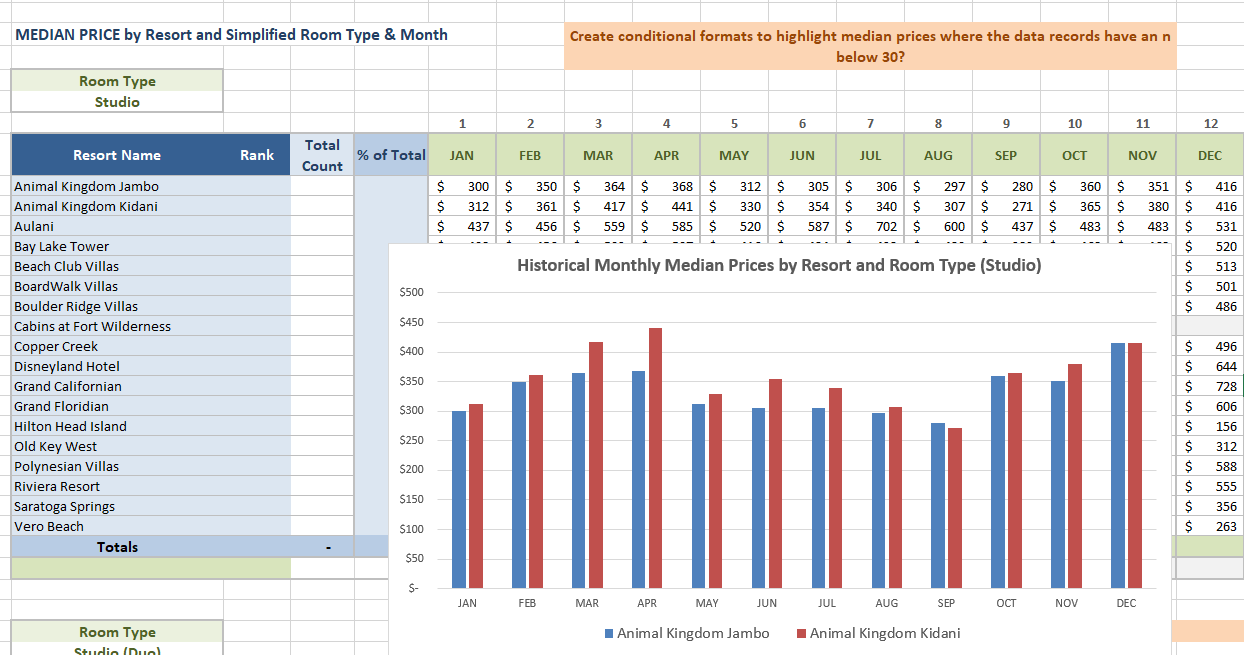
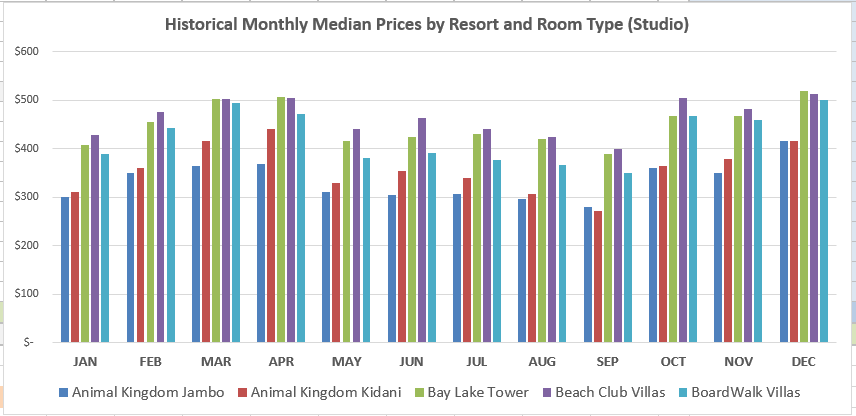
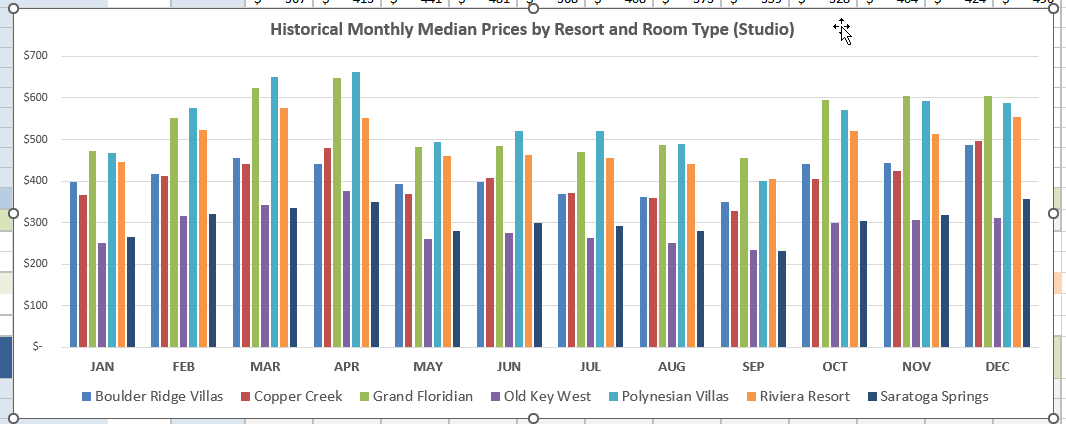
Finally created a set of tables to crunch the monthly median for each resort and room type.
Not a perfect overlap with the various DVC seasons, but I think reasonable enough for an overview.
Playing around with charts using that data…
This only appeared yesterday, but already a $107/n Price Drop!
3-night Riviera 1 Bedroom 01/10 orig $678/night now $571/n or 40% under median
I am curious how this aligns with the point charts. There would be an average cost per room per resort for each month, and one could calculate the deviation from median for each month comparing points to rentals. If Disney was allotting points properly across the year, you would think the highest $ times would also be the highest points. But something tells me that is not the case, for example - in early December.
Price Drop:
2-night OKW 1 Bedroom 12/08 orig $525/night now $450/n or 18% under median
I do think it likely these medians somewhat follow the points charts - I did start creating a sheet that crunched numbers based on the actual points charts dates a few years ago and kind of had it working.
But, it was kind of a PITA and I did it more as a mental exercise than anything -
The real problem was tying the listings to the specific room types in the points system - which is really hard because the listing sites call rooms and resort whatever the hell they feel like calling them on any given day. 
When my scripts grab these listings, I have a routine that scrubs the names into standardized simple room types already - but I can’t 100% be sure that any particular description on a listing tells me the actual room type in the points system. Sometimes they do, often they don’t.
So, after all: I know I’ve said this before a few times, but worth saying again:
I don’t really care about points with these dedicated listings (for the most part): I think a lot of people renting are just trying to beat cash rates, or just want to know where any particular listing falls in comparison to other similar ones.
Kind of like walking into a car dealership: salesman will tell you a price, but how do you know it is good? You compare MSRP and you check KBB or Edmunds to see what past or expected prices might be.
(Of course, you kind of want to make sure that you couldn’t just request the specific dates you want for a trip and get close to the locked in dedicated listings. But, I don’t have any way to know or snarf availability and pricing for requested rentals.  )
)
So, after all of that: I’m thinking posting monthly medians is probably a mostly good indicator.
I also have my other charting tool that crunches the median based on x number of days surrounding each day of the year - I’ll have to see how different those numbers look. We have to think that gathering medians for months with holidays etc is a little more problematic: first two weeks in Dec are likely pretty different than the last 2. I’ve been thinking about how to deal with that, nothing optimal in my brain yet. 
I’ve already agreed plenty with you on all this, so I’ll just add that I think people want to feel like they’re getting a reasonable to good deal. Even if we could handle the discrepancies of room listings, it wouldn’t add much juice to the squeeze for people already familiar with DVC point values, but everyone has at least a base understanding of cash comparisons. Some data are just worth more than others.
Just to be clear, I don’t think you need to add points data to your database. I’m just wondering aloud.  I’m satisfied with my care.
Oh, I know, you always bring up interesting thoughts. Good to have a discussion about it here!
Maybe it just assumes you’re not in 'Merica  Seriously, hope they have an easyish solution.
I see 2 things that aren’t clear at first glance. Price vs Median and Current Price. I know what Price vs Median means but I’m not sure what you would put in the “from” and “to” boxes. Also, the current price- is it daily? Guessing so. But it could also be the total price you want to spend on the reservation.
Other than that I love it! Love our new DVCseer mascot, love the easy to read chart! Thank you for your dedication to this! 
It’s difficult because all the brokers rent at different price points per point. If you could guarantee that a particular room advertised WAS ACTUALLY the room category booked, a price per point being paid would be obtainable. But I also do not think it’s THAT important.
Answering the second point first: it is just the current price from the last time the data was refreshed. 
I mentioned the Price vs Median filter boxes in my first link to the new sheet (see below.)
I don’t like it either - even though it is a percentage, I can’t get the filter to show entries in it formatted as x%.
Also, it seems so far that this new plugin I am using to serve the tables won’t let me use formulas to filter, as I do in the current version. In that version I have it set up so when you select, say, -10% in that filter it shows you all listings <= to 10% under median.
In this new tool, the best I can do is make it a range - hopefully I figure out a workaround later to make that filter clearer.
Thanks for the feedback!
So daily rate price. That’s what I thought. But I was multitasking and my brain was over thinking it, lol.
It’s probably not used as much as the others. I don’t use it normally. I missed that I needed to put the -.
All righty, I have reinstalled my site with a clean setup and this should be the new home of the search engine from now on:
The site as a whole is still plain vanilla for now, I had added a few new options to my data plugin and had to fight through some new weirdness, so didn’t get a chance to work on the site design as much as I wanted.
It’s looking good. I did a search for the Cabins at Ft. Wilderness and I’m happy to say that my AP discount is much better than the prices for my trip.
However, fix this awful lack of contrast sooner than later. Now I need to get off the computer so that I don’t get a migraine. 
That is one of the things I’m fighting with. Changing the colors in the plug-in does nothing, but the same colors happen no matter what theme I am using. I tried overriding it with custom css, but that didn’t work either. I’ll figure it out sooner or later, but I agree: whomever designed that button as a default should be taken out back and flogged.
Absolutely  %.
%.
Can you please pin this at the top of the thread?