WHAT DO YOU PEOPLE WANT?!? (In Restaurant Ratings)

One of our projects for 2026 is to better display the data we have around restaurant ratings. This includes historical data like survey ratings over time.

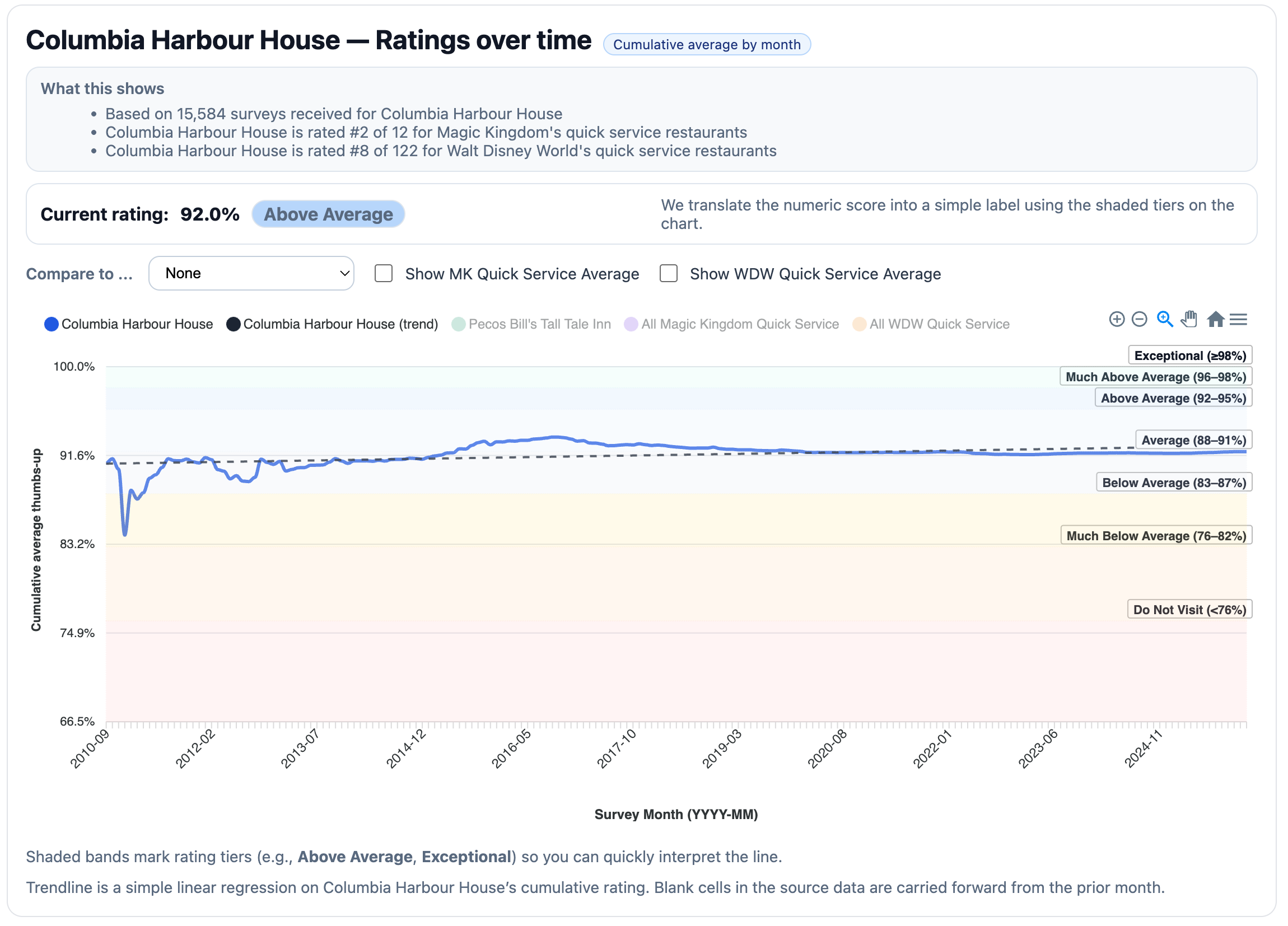
I’ve been playing with chart ideas that display what we know about Columbia Harbour House as an example.

Here’s the latest chart idea if you want to play with it. :left_arrow: It’s interactive!

Here’s what that chart currently looks like as an image:

:warning: Assume you’re researching Quick Service restaurants in the Magic Kingdom :warning:

:police_car_light: Here’s what I want to know :police_car_light:

  1. Is the chart’s information understandable?
  2. What ratings information do you want to see when researching that restaurant?
  3. How important is the ability to compare two Quick Service restaurants side by side in the same graph?
  4. How important is “ratings over time” feature?
  5. Is there anything not in the graph that you’d like to see? (For example, a shaded area representing margin of error?)
  6. Is there anything in the graph that is optional or not needed?
  7. Is there anything I’ve not asked here that’s important?

Thanks for your help with this! I will create a new forum badge for participants in this topic.

6 Likes

This is not information you currently have … But I would love to have rating based on the kind of eater a person declares themselves to be.

For example, while California Grill may get high marks, I look at the menu as a rather tame eater and go, uh, no way!

I would love a way to filter ratings based on those who have similar tastes as myself.

Not sure if that is possible.

3 Likes

If it was possible I’d like to see maybe the most common reasons for the rating.

For example: CHH Average rating 78%

Recent(*) most popular reason:

  • good range of menu choices
  • extra seating upstairs
  • reliable quality

(*) over last 12 months

To be honest I can’t remember if you just give a rating or if you can give a reason. So you may not even have this data.

4 Likes

When I look at the text at the top of the chart: #2 in MK, #8 of 122, and then look at the chart- it doesn’t make sense to me. I look at that line graph and I would think, “ok, average quick service” but the #8 out of 122 just average?

I don’t need to compare two restaurants.

4 Likes

Thinking about this, I don’t think I need to see years of data. Two specific examples: Sunshine Seasons used to be a “must do” for many liners. It is not the same restaurant. The same thing can be said about Be Our Guest. Even if you love it, you cannot compare anything about the current dining experience to the QS/ dinner meet the Beast meal (or just cupcake).

6 Likes

I really like the ratings over time graph, I would find that informative.

2 Likes

It’s cool but seeing it since inception is probably not relevant for most users. Maybe a 5-year horizon as a default?

I think the most valuable part of this graph is the bands of average / above average, etc. to give an anchor for how the rating compares to other restaurants, because all user rating systems tend to have a somewhat arbitrary scale so you can’t tell anything definitive based on a single restaurant’s number. It is only valuable in comparison to other ratings, which the bands do. If there is a way to show a comparison with another restaurant as an anchor point, that would be helpful, too.

IYKYK

4 Likes

First, thank you for all the hard work you and the team do analyzing all of this data!

1-yes, it is understandable. At first glance, it appeared cluttered to my ADHD brain. When I put my phone into landscape, it reads better. I also appreciate the simple percentage number breakdown for those who may not want to read the graph or details.

2-I think you’ve covered it all. If people want more detail, they can find that in the actual description or reviews. I feel more would lend to a cluttered appearance.

3-For me, not important. I can go to each restaurants ratings just fine.

4-I guess it’s good to see if there’s been a recent decline or improvement compared to the last time I was at a place(possibly years back and it may not be what I remembered. Limiting it a certain time range vs all time would be more useful, agree with comment above.

5-Nope

6-I think I would like the color key words to be not directly ON the graph. Maybe offset next to it, or above it with little square color blocks and explanation for what each represents there? Might help brains like mine to view the graph easier? But if I’m the minority thats fine too.

7-All good here, thanks!

4 Likes

I definitely agree with this. With how often WDW changes menus and service models, I think the last year is really all that’s relevant. Who cares if someone rated the restaurant above average 3 years ago??

3 Likes

I think it would be helpful to filter on the survey demographics. Trip Advisor does this. I am able to filter reviews based on “family travelers” versus “business travelers.” I think it is helpful to know that other parents with kids rated something above average. I also would think that adults only would prefer the ratings from other adults.

I do very much like the ability to compare among “MK quick service” as a category because usually you are picking by location and not completely across property. What might be cool (but perhaps not doable!) would be if you could include MK resort QS in that? This drives me nuts about WDW restaurant search. You either get a park or literally every resort restaurant. I would like to decide between maybe Casey’s or CHH but could easily be persuaded to go to Contempo or Captain Cooks.

7 Likes

Not very often, but how well they implement those menus and models can change quickly.

A case in point is Steakhouse 71. In December 2023 I had some excellent crab cakes there, but in January 2025 they were below acceptable. The culprit was a huge turn over in staff which caused a decline in the quality of the preparation and service. A multi year graph would be helpful in deciding if and when to go back.

3 Likes

(Did anyone else think this thread was started by Mousematt - I forget his latest profile name - when they first saw the title?) :rofl::rofl::rofl:

8 Likes

Of course, in December 2022, my wife and I ate there and the steaks were inedible. Literally. I ate only two bites of mine, my wife ate maybe half of hers. So, it sounds like S71 is consistently inconsistent!

Agreed! There are some places that I have written off (or adored on the other hand) 3, 4, or 5 years ago. It would be nice to see (or be able to see) if there’s been a big change in reviewers’ perceptions since I last ate there.

4 Likes

I think this is why I would want to see ratings over time. For those liners that may visit less often, they may remember Sunshine Seasons as a must do - but seeing the decline over time would help them believe the newer ranking.

  1. The chart is understandable - but the way this part is presented feels distracting:

  1. I would want to see breakfast vs lunch ratings if it is a restaurant that serves both.
  2. Not at all important
  3. As I mentioned above, I think it is important for people that maybe don’t visit as frequently. They might remember that Garden Grill was the best breakfast they’d ever had in 2019 when they last visited - but, it isn’t as great these days (random example, I don’t know if that’s true)
  4. I don’t think I need to see margin of error
  5. No that I can think of
  6. Like @ryan1 and @melcort10 I wonder about filtering by the types of people dining.
2 Likes

I guess it’s just me but I don’t think anything at WDW, especially restaurants, can be compared to pre-Covid.

If I personally didn’t like a restaurant in 2022 then I see that it has good rankings in 2024/2025 I am just not sure it makes a difference if people rated it high or low 4 years ago.

6 Likes

Is the chart’s information understandable?

Yes, I liked the colored bands with the written labels on the right side of the chart.

What ratings information do you want to see when researching that restaurant?

Not a graph, but I would like to see the written reviews.

How important is the ability to compare two Quick Service restaurants side by side in the same graph?

I like the comparison feature, although I don’t know that I’d use the option to compare to all other restaurants in WDW - if I’m in MK I only really care about what’s in MK. The only exception to this might be comparing hotel restaurants to other hotel restaurants across all of WDW.

How important is “ratings over time” feature?

I think it’s important to see if there has been a consistent decline over time, that way you know if a bad review is a fluke or the new normal.

Is there anything not in the graph that you’d like to see? (For example, a shaded area representing margin of error?)

Sort by age groups (families with kids, over 30, etc)

Is there anything in the graph that is optional or not needed?

I’m a “the more info the better” person, so no.

Is there anything I’ve not asked here that’s important?

Only to reiterate my stance on seeing written reviews. “3 Stars” by itself doesn’t mean a whole lot to me.

2 Likes

Apologies for the length. :laughing:

#1.
I like the “What this shows” section, and the Current rating: summary with label. Those are very clear. I also really appreciate the context that a 92% is Above Average and how those bands are broken out. I played around with the interactive chart and really like the selection zoom.

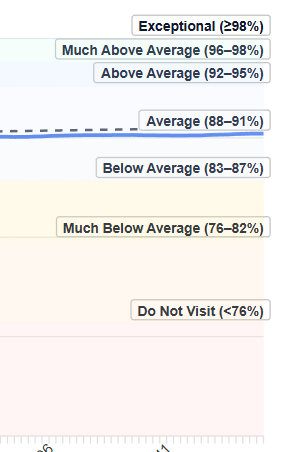
The biggest UI issue for me (currently on laptop) - the Average (88-91%) label overlays the CHH lines. It confused me for a minute, because the current rate is Above Average, but the chart lines are right under the Average label.

It might help if each of those labels were actually inside the section they’re representing, instead of above it? Even if you bumped up just the Average label so that the lines can be seen, it still gives the impression that CHH is in the average band when it’s not, but there’s not really room below the lines / above the Below Average label.

I don’t know if making those labels transparent would help - you’d see more of the lines, but the words would still be blocking part of them?

Maybe see if those labels can be moved off the chart, although that might cause issues with width? This is the similar to #6 from @WendyFoundHerHEA

Also, without the labels, I think the color differentiation between tiers would be really hard to see, especially between Average / Above Average and Do Not Visit / Much Below Average. It’s very pretty right now, but I think there needs to be more contrast.

There is some weirdness if you use two fingers on the touchpad, in both selection zoom and panning modes (click + 1 finger drag works fine). Perhaps disable that if possible?

I might make it clearer that this is “Thumbs-up Ratings over time” in the title. I think I need to rate more restaurants in Touring Plans. :sweat_smile: I’m used to more of a Yelp or Google reviews model where they get rated on a 5 point scale.

#2. One of the most important for me in finding this data useful is being able to recalculate that “current rating” for different time series. Is the 92% since 2010-09? Could I get a rating percentage since, say, 2022-01 instead (based on the selection zoom)?

Personally, I research restaurants based on menu and reviews. Some restaurants are amazing but don’t have menu items that look super interesting to me (e.g. Citricos), or I know someone in my party will have issues eating there.

I really want to know what dishes people liked the best, versus just having an overall number. I would love a quick list of “top dishes” or “most recommended” (although as @melcort10 noted, that can get stale pretty quickly, so it might be hard to maintain).

#3: I really like seeing the comparison lines in the sample chart. I’d love to do that with more than 2 restaurants.

I would be okay without comparing on the same graph, as long as there’s a page that has the current ratings for all the QS restaurants side by side.

Also, if I have multiple lines enabled in the chart, only the mouseover box for the leftmost line in the list shows up. I would expect that if I am mousing over the CHH line, its box shows up, but if I’m mousing over the Pecos Bill line, the PB box shows up. I can’t get the PB box to appear without turning off both CHH and CHH trend lines.

#4. Ratings over time is really important as long as you can choose your time series (like in the sample chart).

#5.

Would showing margin of error give insight into how spiky the reviews are (inconsistency)? If so, I’d definitely like to see that.

I’d also like to be able to click on the #2 of 12 / #8 of 122 and be taken to the full list (so I can see which place is #1).

If there are reviews / surveys with color, I’d like to be able to click on the 15,584 surveys to be taken to people’s comments.

#6. I guess maybe the labels of the tiers, if they can be moved to a legend or key or the like not on the chart.

#7. How do you calculate the shaded tiers (Above Average, Average, etc.) - are they consistent across all types of dining, or do they differ based on categories? Is it a flat scale or like a bell graph?

Yes! Also lounges in the same area.

Also this.

4 Likes

I agree. I also think a majority of TP users that will look at this will have very little prior experience with these restaurants. This data might be interesting to us, but will I use it to plan my dining? Who will this help?

1 Like