The charts would look a bit different on a small screen, and you’d have the ability to zoom in as desired. We could potentially present a simpler version in the app, and that’s something to think about. Thanks!
3 Likes
All of them would use this format, although some data don’t apply to some scenarios. For example, we will only have predictions (no observations or same-day adjustments) for future dates.
When we make same-day updates, we update for the remainder of the day (so current/future hours). We don’t predict the past, although the same-day prediction line will show the latest-forecasts-before-the-time-passed for times in the past.
An intra-day update forecast can be triggered be a few different things (like a wait time submission from the Lines app). There’s not a limit on how frequently it can run, although I’m sure there’s a point where that might overwhelm our systems. So don’t try it!
I guess it looks nicer? The dots emphasize the uniqueness of the user-submitted, measured wait times, but you’re right the data behind all the lines on the charts are a bunch of “dots.”
That vertical line indicates a time when the posted wait time was observed to increase by more than 30 minutes. That could indicate that something strange was going on that boosted/dropped wait times.
The Offline band is translucent and should not obscure anything. During offline periods, we should not have posted wait times (that’s how we know it’s offline), so there may be gaps in some lines during offline periods.
Predicted wait times are not generated using a donor date in the past. Historical data are the basis for our forecasts, but we look at lots of different characteristics when calculating forecasts for a given attraction on a given date. The first forecasts we share are a year in advance, so I guess that’s their point of “conception.” Obviously we create them a bit before we make them live.
We constantly monitor how well we’re predicting wait times, and we make adjustments when we believe we can improve our predictions. There’s not a specific schedule for updates. It could be triggered by unanticipated changes to park hours, but it also could be that we’ve got new data that suggests wait time trends have changed for a park or attraction, or that Len found a clever adjustment that improves accuracy.
I realize that although I’ve provided answers I may not have given you the context you’re looking for. To be honest, I struggle to see utility in these charts (how will folks use it to impact their trips?), and that’s one of the reasons we’re asking for feedback.
2 Likes
While I find the graphs interesting, I would not use them to plan. Nor would I be likely to access them while in the park. It’s too much information on one specific ride. Especially since I wouldn’t definitely be on my phone.
Possibly if I had a family member with one major priority I might want to see how that rides been doing, but I wouldn’t be likely to use these as a general planning tool. Possibly I’m in the minority on this.
How are you hoping people will use this? I would probably only use this after the fact to go “oh! Sure. It was rainy that day which explains why test track was so wonky. Here’s the data.”
1 Like
I love having these types of charts available when planning. Kind of like I am not comfortable using Google maps blind - I don’t input a destination and just follow the directions, I want a general sense of the direction and what to expect along the way. I create a optimized touring plan, but I want a general understanding of how the wait times behave. It helps me then make day-of decisions when something changes or doesn’t go according to plan.
2 Likes
Thank you David for working on these new charts! I did utilize the old charts with the green dots.
Terrific! That will be a great new feature. Hopefully better than what Thrill Data has.
I’m testing out the “past” data and sharing my steps and observations.
- UOR Crowd Calendar
- View Past Dates
- See All Details from Sunday March 1, 2026
- See ride-specific details here
- (While still displaying Sunday March 1)
- choose attraction, Battle of the Ministry
Issue 1: The new version ride specific chart displayed is from today 3-28, but 2026-03-01 is still in the URL.
Issue 2: And from that page, when I view another date, it displays the old bar chart and the new chart won’t come back.
I’m basically unable to access past days and future days of the new chart.
Thanks in advance!
1 Like
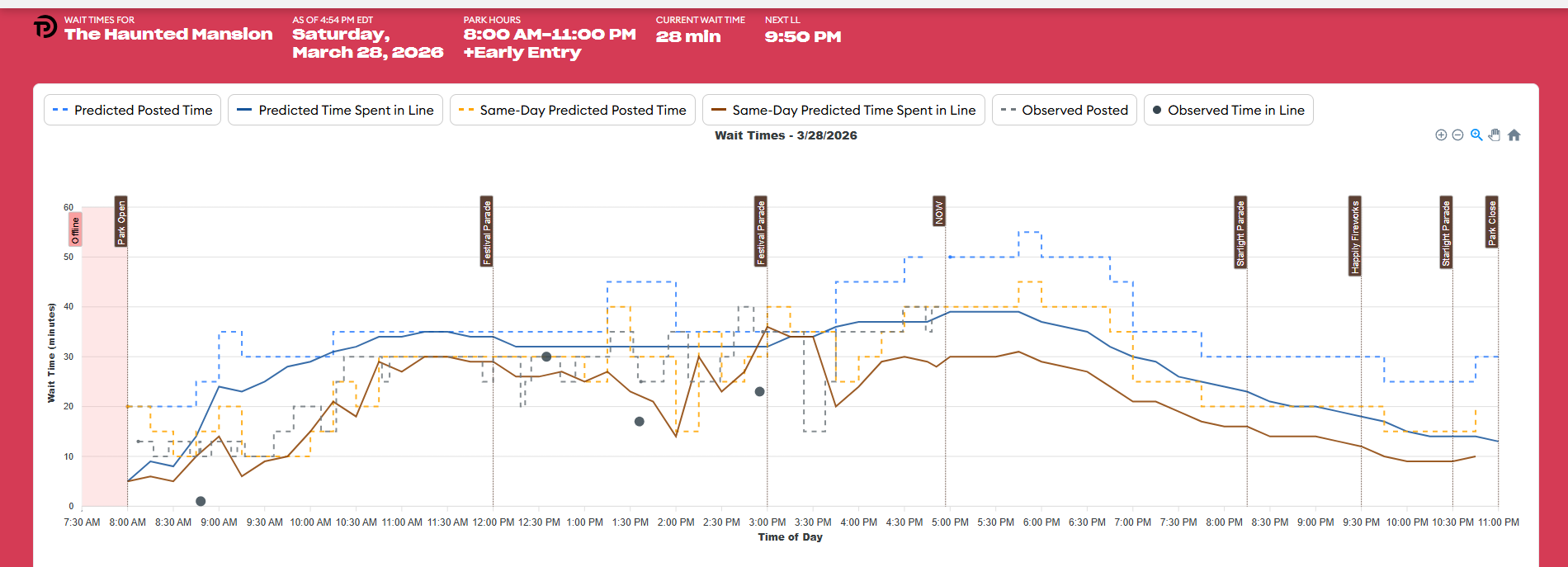
Here’s my take on all the language @PrincipalTinker :
- Predicted Posted Time = What wait time to expect from an attraction at any given time for a specific day in the future
- Predicted Time Spent in Line = TP’s prediction of what wait time to expect from an attraction at any given time for a specific day in the future
- Same-Day Predicted Posted Time = Adjustments made day-of based on early observations and incoming data
- Same-Day Predicted Time Spent in Line = Adjustments made day-of based on early observations and incoming data
- Observed Posted = The collected actual posted wait times throughout the day
- Observed Time Spent in Line = Actual wait time submissions by users (the dots)
1 and 2 are used to plan your day well ahead of time. Whether just relying on TP to use this data to make your touring plan, or if you want to see the actual ride specific attractions to personalize your plan.
3 and 4 are useful day-of when in the park and conditions change. Some may use the app to get updates and many will not be interested in utilizing.
5 and 6 are the actual (real data) posted waits and user submitted waits, after the fact. This is the data I like to look back at in the historical charts.
When someone really wants to dig-in to the planning, the ride specific predictions at a certain time of day are so helpful. Also, when TP stores the data from 1 and 2, they are held accountable to how close they were at predicting. Comparing 1 and 2 with 5 and 6 gives you a visual of how much more or less wait times were than initially predicted. This is the data I love to look at.
Yes, you’re right. But, it’s still nice to have the ability to observe the changes/day of forecasts visually.
I’ve played with the new charts David and they’re great! Way better than the old ones. I love that they’re customizable and you can hide the data you don’t want to see, or wanting to only compare 2 points of data. Well done!
1 Like
Thanks, for trying to help me. I am trying to predict (in my mind) the questions that will be posted in chat. I am wondering if the average user may try to make sense of the times on the touring plan they just created and when I went back and forth between a touring plan and theses data points, I thought the terms were different. For example, predicted time (future) is “est. time”.
I can’t help but think of all the posts on chat of users that seem to think these data points (past), and unoptimized plans, are static data points. When the day of in park changes not considered (by the user) it is Touring Plans fault. I think this data is great for a certain group of users but for planning, I think there is also a group that only use TP for the crowd calendar and touring plans. I think this can help show those uses why plans need to be updated and optimized but only if they can connect all TP tools with consistent terms.
I know there are users that have been begging for this data. I think it is exactly what they want. I am just trying to think how it can be presented to avoid new users from being confused and angry.
2 Likes
I think most new users will not use, or be interested in these attraction charts on the TP website. They are more for the experienced power users.
Remember, these charts and data have not been available for a couple of years, when TP redesigned the website. We all lost access to the previous charts.
I think the future chart data for entire parks will be more popular.
1 Like
Yes, but I think it can help newer/first time users see the difference between predicted and actual waits and why the touring plans tool was just updated. It might show for some great examples. Some chat users used to reference those old charts to help newer users.
2 Likes
That’s a bug. Thank you for sharing the details of how to replicate it. We’ll get it fixed.
In the meantime, if you want to explore this date, starting directly from the attraction page should work better:
2 Likes
Glad to help.
I tried that earlier just in case it worked…but no can do.
1 Like
Thanks. Yes, I see what’s happening there. (I tested it, but evidently I did so poorly.)
In the interim, this will get 3/1/2026, if that’s what you want.
2 Likes
Great, thanks. If I use your link and change the date or attraction in the URL, it works.
You should now be able to shift from day-to-day and see attraction wait time charts for different days. I’m sorry about that problem, and thanks again for letting us know about it.
Do not expect the URL to change when you change dates.
2 Likes
Terrific!
No problem.
One question. Is there a way to enable personalized chart settings to be saved as default or saved as you change dates? For example, if I wanted to hide the same day data as I change days. Currently, charts default back to the original settings of the predicted times being hidden when looking at previous dates.
Anything is possible! We’d need to identify the currently-enabled series and relay that list to the code that generates the next chart.
What is that you want to compare on multiple days? That might give us an idea for a different chart.
1 Like
Great, thank you.
If I would want to compare multiple days on the same chart, I’d definitely want to see Observed Posted + Observed Time in Line over many days. That could be maybe over a 7 day span. Or, I could see comparing 4 consecutive Saturdays (or whatever day) to get a better feel for that day of the week in general.
Those two data points are important to me because they are FACT. But that’s just me. Example: I actually prefer using the 1 year ago crowd level/wait time data (same day of week) instead of the actual Crowd Calendar. 
2 Likes
I’ve always wanted to know: when does the “wait time” officially end? Does it end where the LL and SB queues meet? Does it end at the preshow (if there is one)? Does it end when you are told “Lane 4”? Does it end when you’re finally taking off?
When you’re timing a wait, the app usually says, “Stop the timer when you’re about to board the ride.” So this is the standard – from the time you meet resistance in the queue until you board the ride is the “wait time.”
This is of course not perfect, but it makes it relatively straightforward to compare waits for a given attraction.
2 Likes
2 Likes