Thanks @quicha! This is fixed on my local machine and I’ll put it on the test server later.
I’ve extended your WDW subscription until the end of the decade. Let me know if you need a little more time. 
Thanks @quicha! This is fixed on my local machine and I’ll put it on the test server later.
I’ve extended your WDW subscription until the end of the decade. Let me know if you need a little more time.
Thanks for this @SirGreggLadyV. Adding that now.
The issue around TP Picks should be resolved from a previous fix, which I’ll post later.
This is an interesting idea. I’ll take a look at it. Makes sense to me.
I get that it’s important to a significant number of people. The top-to-bottom order comes from the voting everyone did in a previous thread.
Love this idea too.
This should be fixed in the next release. Thanks!
Yeah, I missed some ‘floor’ options. @SirGreggLadyV’s earlier post identified the issue. I have a fix for it in the next release. Thanks again!
Ha! You must have found the hidden Club Level rooms at Sports.
This should be fixed in the next release. I had an error in the code that built that drop-down.
Your TP subscriptions now run through the end of the decade. Thanks for the help!
Thanks @galuchies_463555. Your WDW subscription now runs through the end of the decade.
A quick question: If you’re searching for ‘Resort View’ rooms, are you expecting to see photos that do NOT include views of the Savannah? Or are we showing “Savannah View” rooms along with Resort View?
I ask because some rooms (e.g., 22XX) are classified by Disney as “Resort View” for booking purposes, but the Additional View field definitely has some “Partial Savannah View” options. So the room photos would show savannahs.
And this is one of the reasons why we wanted to add that extra drop-down. Not all “Resort View” rooms are the same.
Thank you @meekomist. This will be fixed in the next update. Your WDW subscription runs through the end of the decade now. Thanks again!
Thank you! Your WDW subscription now runs through the end of the decade.
That is AWESOME detail.
I verified those room views are what Disney has as well, even though the rooms are near each other.
Thank you!
Ooooh. That’s not something that Disney has for Pop. Let me see if I can add it so it doesn’t overwrite anything else.
Thank you! This should be fixed in the next release as well.
I re-checked these rooms against the spreadsheet, and that’s how Disney has them classified:
4322 might be Resort View because it connects to a Resort View room? I’m guessing here.
Tested this more, and it appears to be an issue the first time you select a hotel from the main landing page…but if you go back and select a different hotel (or re-select the same) it correctly scrolls to the top. So it does appear to be a “first time only” for a given “session” issue.
Poking around now with the newest changes, and I think I see what the other issue I reported is doing…but it doesn’t seem intuitive to me. That is, I scrolled down (BLT) and first selected “Upper Floor”. Then, I scrolled back up and selected “Deluxe Studio Resort View”. At this point, it apparently “deselects” Upper Floor from the filters automatically. I wouldn’t have expected that. Instead, I would have expected that the Room type would be narrowed to the scope selected in the other filters. What makes this particularly unintuitive is that when it deselects the floor filter, that is “off screen” (because the font is so ginormous) and so I had no way of immediately noticing that it had deselected filters I had set.
That was wordy. I hope it makes sense.
More on Port Orleans Riverside.
Again using 5th Sleeper Woods view, if I set the filter for walking distance to lobby to be 3 minutes or less, this narrows my options from 503 to 445. Now, if I instead use the location preference to close to bus stop, it narrows from 503 to 56. I guess I’m curious what that threshold is one for less than or equal to 3 (could not use symbols to write that or this would not have been family friendly) and the other just less than 3. Can you really access almost 400 more units in a minute?
Found another couple issues…again, with BLT.
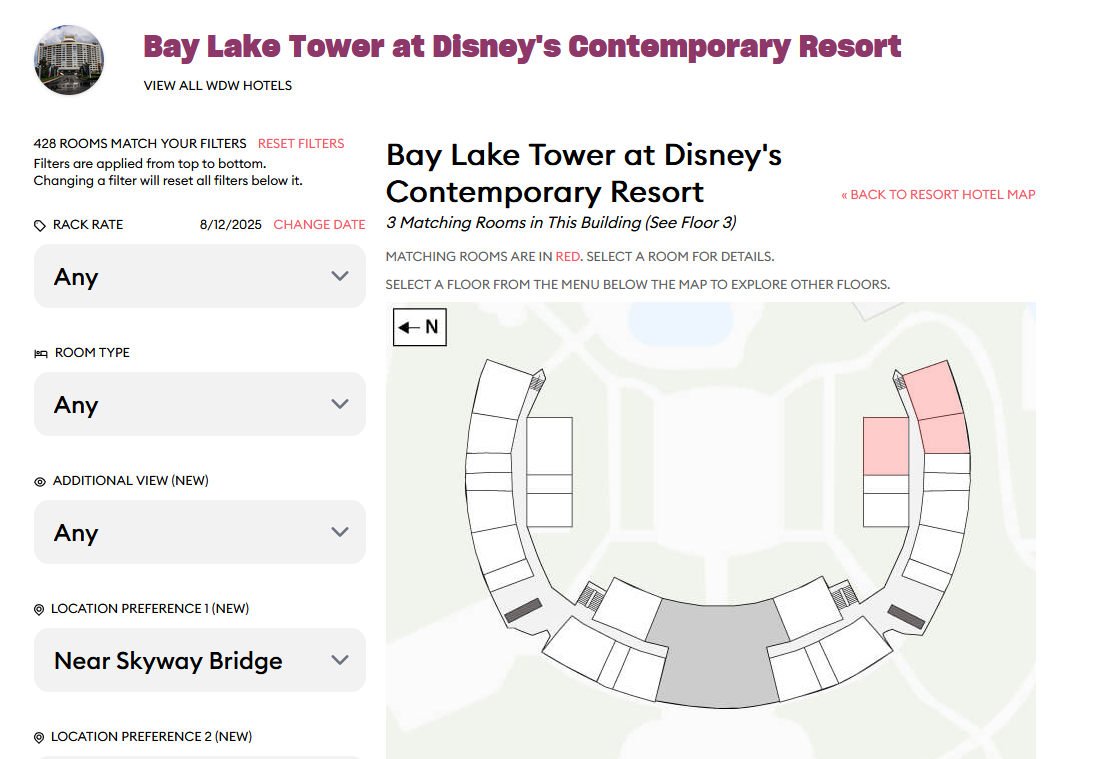
I selected JUST the filter “Near Skyway Bridge”. It says there are three rooms:
But if I then click on the building, it takes me to this:
If you notice, while it says there are 3 rooms which match the criteria under the name of the resort, over in the filter column, it now says there are 428 rooms matching.
And…curiously…there are rooms closer to the Skybridge than those shown. (Skybridge is on floor 5, not floor 3 for example.)
For all you do for us here I am always happy to help, this is so generous, thankyou.
I believe the room finder shows a large pen right below in view of that room. That pen would also be in direct view of the rooms right next to that room (but classified as Savannah). I think the question is, those rooms use to all be standard view (resort view). Did Disney reclassify recently that the only resort view rooms are the ones directly above the pens?
Contemporary thought. Can there be a filter, maybe for the room type, that selects the tower or the garden wing? Then all your other filters relate to those subsets only? I’d guess this could be done with Coronado as well, but I’m not as familiar with that resort.
As of 3:30 pm, all of the things through like message 45 (ish) should be resolved on the test server.
Would the “Garden Wing” room types work for that scenario?