@len, after 40 postings what is the answer?
1 Like
In general, the app should refresh automatically when any of these things happen:"
- 10 minutes has elapsed
- When focus is returned to it after switching to another app
A follow-up question is whether this actually happens correctly in the parks.
We don’t. We say we know how long it takes to walk it when nobody’s in the line. Some things just have to be approximated.
4 Likes
So the walking time includes the time it takes to walk in the queue?
1 Like
Headed down for 9 nights next week. I’m relying heavily on TP for the first time bc LLMP has thrown me for a loop. I’ve done all of my prep using the web version–are you saying you were able to make good use of the plans in the web version on your phone in the parks but you were not able to make good use of the plans in the lines app while in the parks? That’s a bummer but if the web version still was helpful that gives me hope.
1 Like
Not the question you asked, but I don’t use Lines for in park times…just planning ahead of time. Every time I have tried to use it in the parks, it was an epic failure in various forms. I just have given up on it. But I still find it useful for planning our days ahead of time.
I did try to use it for Jollywood Nights a couple nights ago. Again, it didn’t go well for reasons I posted in another thread.
I love TP and all you guys do, so it pains me to say that I just don’t find the in park usability very compelling.
If I were using it in park, I have learned to refresh, but isn’t what I would assume I would have to do. The MDE app does both. I can pull down to refresh immediately…but it automatically updated about once a minute give or take
6 Likes
I use the web version in the parks vs the lines app. This doesn’t help with line time collection but I wasn’t very good at that anyway.
What I do is set my walking to a slower speed, figure my day and then every hour I delete steps, update my start time and I’m back on track. I find the predicted waits are fairly accurate. I see people complain of real time waits prediction but maybe lines has it different? Not sure but I also don’t optimize. Setting your walking speed to a slower pace and accounting for your likely breaks should allow you to keep the schedule in real time.
1 Like
Our November trip was the first time I truly depended on the app in its intended purpose and it worked very well. I marked off rides as we competed them and would reevaluate after almost every item. I occasionally made changes to our plan and would want to see what TP said.
Near the end of the day I work optimize to make sure latest wait times, etc., were directing the plan.
We were there RD to close or near-close 6 normal days, hopping three of those. It sounds like I’m the outlier with a great use scenario. The only hiccups were usually with RD’s waits being off at AK and EP despite being almost front of the line.
6 Likes
I could find no way to actually do this (that worked). I poked around the app, but still have no clue how to do it.
1 Like
I recall this morning. It showed a 0 wait for GotG. I remember saying that *might throw things off. But you recovered quickly.
1 Like
The done button shows up day of, if you don’t use it in the park you wouldn’t see it?
3 Likes
I was in the park when I was trying it. There is no Done button. I could select the three dots and then say I completed the step, but it wouldn’t actually make any change to the plan. All steps continued to show up.
3 Likes
Actually - it was not easy to find and I’m still not sure how I found it. But once I did each day it stayed available.
3 Likes
You remember correctly! And it fell into place quickly.
2 Likes
I’ve been looking at the GOTG issue that @disniddles posted about on Monday, which was:
- At 3:36 pm on 2025-11-25
- Disney’s posted wait was 60 minutes
- The Lines app predicted 30-ish minutes, according to disniddles
- The actual wait was 59 minutes
@disniddles I didn’t ask, but I assume you stopped your timer right before you boarded the ride vehicle. Let me know if that’s not the case.
Here’s what we’ve found so far:
Our Original Predictions and What We Observed
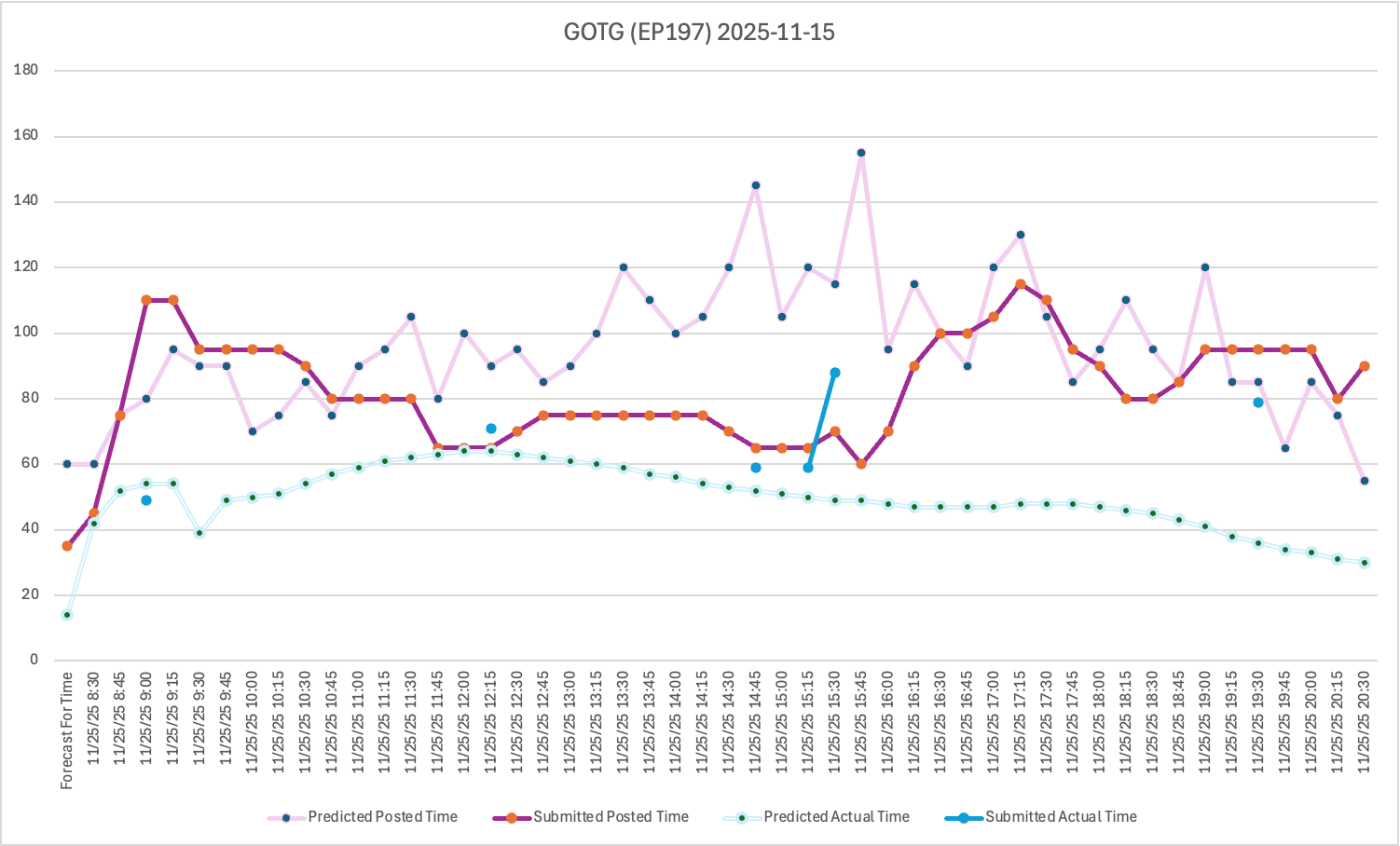
The light blue line is what we predicted the actual standby waits would be, before the day began.
The individual blue dots are the actual standby wait times that were submitted by y’all in the park (excluding outliers - someone submitted multiple 0- and 1-minute waits).
So right off the top, the first four actuals we got were reasonably close to our original predictions. Had we not made any intraday adjustments, we might have been better off:
- Disney’s posted wait was a couple minutes more accurate between 2:45 pm and 3:30 pm.
- but Disney’s posted wait was off by > 100% first thing in the morning (the leftmost actual wait, which was a posted of 110 on an actual of 50). Whoever that user was, they were probably really happy.
The next step was for me to look at how actual waits compare to posted waits at various points throughout the day. Here, I’m only using data from after the DAS crackdown, which we’re saying is July 1, 2024 until now.
Here’s a graph that shows the actual-to-posted ratio (actual wait divided by posted wait) for GOTG since then, with outliers removed:
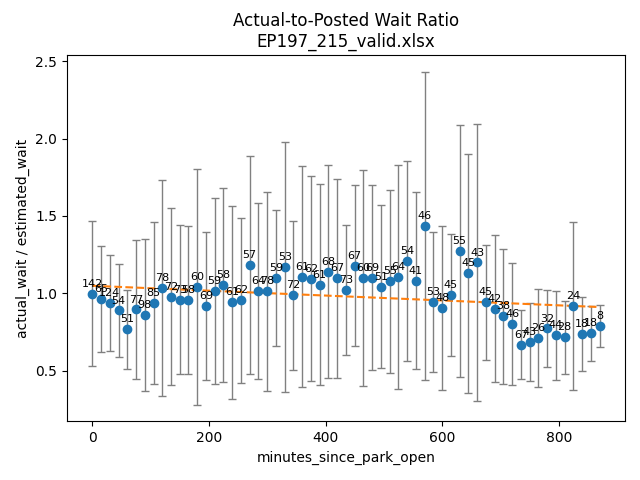
The blue dot is the average ratio for all the wait times we’ve got, in 15-minute buckets starting with park opening.
The number above the dot is how many actual wait times we have for that 15-minute bucket. So, as an example, we have 142 actual wait times for GOTG since July 1, 2024, for the first 15 minutes that EPCOT is open. And for all of those the posted wait is pretty close to the actual wait (the ratio is pretty close to 1.0)
The gray bars are the 95% confidence intervals. They are wide, and that’s expected.
The orange line is the trend line during the day.
Some observations:
- If the posted wait was always what you’d actually wait, all the blue dots would be on a straight line at the 1.0 point of the y-axis. But it’s not a straight line.
- We don’t currently use this data to make intraday adjustments. I think this is
 Issue #1
 - But this data might be a useful guide that tells us what times of day we can believe the posted wait time, and when we can’t, for those intraday adjustments.
Intraday Adjustments to Posted and Actual Wait Times
I also went back and looked at how we made intraday adjustments while the park was open. It’s an old process, dating back to at least 2017. And I think we made some assumptions back then that have not held up over time. In particular:
- The current intraday adjustment process makes changes to the “rest of the day’s” posted and actual forecasts based on the last 5 posted wait times we’ve got.
- In practice, that works out to about the last 10 minutes of clock time
- So roughly every 10 minutes, we’re re-forecasting out the rest of the day
- Which means we have a series of forecasts:
- Forecast 0 - The one we make before the park opens. This is the pink line in the graph above
- Forecast 1 - At 10 minutes after the park is open
- Forecast 2 - At 20 minutes after the park is open
- Forecast 3 - At 30 minutes after the park is open
- :
- Forecast 60 - At 600 minutes after the park is open, and so on until the end of the day
- Which means we have a series of forecasts:
- We make those adjustments off of the original posted forecasts, not the previous forecast
And I suspect that last thing is another problem: If the original posted forecasts were too high by X minutes, we reduce future posted forecasts by X minutes to compensate. Then we re-calculate the actual wait based on the posted wait.
That means the intraday process is susceptible to fast, sharp swings in posted wait times.
You can see this happen in the first graph above between 4:00 pm and 4:15 pm, where we’d predicted the posted wait would go from 155 minutes down to 95 minutes.
Disney’s posted wait at 4 pm was 60 minutes. We’d predicted it would be a posted of 155, so we were +95 minutes on that. This is Issue #2.
The intraday process then subtracted 95 minutes from the next few forecasts, including the ones that were … 95 minutes. So the process essentially predicted a posted wait of 0 minutes, which we rounded up to 5 “for safety”, and that’s what we displayed in Lines. This is Issue #3.
We save those calculations, and here’s what they looked like. The highlighted cells are the ones with the bad adjustments:

Our Plan to Fix This
There are a few things going on here, not just one simple thing. So we’re going to move in phases:
Step 1: Re-run our posted and actual forecasts using data just from 2024-07-01 and later, to avoid any pre-DAS crackdown data. Before this we’d been using data from 2021.
Step 2: When forecasting posted wait times, use the actual-to-posted ratio table instead of the current Monte Carlo simulation. That will better link the actuals and posteds. It will specifically address Issue #1 and part of Issue #2.
Step 3: Modify the intraday adjustment process to look at the last set of forecasts instead of the original set of forecasts. That will address part of Issue #2 and Issue #3.
Step 4: Use the actuals-to-posted ratio table to reset our intraday forecast of actuals, which is also Issue #1.
The first two steps are not especially difficult, but they are time-consuming. We check every model manually before it goes into production, and there are several dozen critical attractions to review. We also do at least a day of in-park touring plan testing before releasing them to the public. So this is probably 2 calendar weeks.
The next two steps are also likely a couple of weeks. The process isn’t complicated, but the code is old and has a lot of moving parts. So we’ll want to run that on a test system for a while to make sure we understand how the new changes work. I’m guessing this is also 2 calendar weeks.
Sorry for the long post. This issue has been driving me crazy since I started looking at it in August. I’m really glad we have specific examples of it now - I feel much better about being able to fix it.
22 Likes
I must also be an outlier. I have been using TP for years. Before going I will make a personalized plan and use the mobile app in the park. After every two or three steps I will mark them complete and reevaluate. If the planned times and actual times start to get way off, usually we are ahead of schedule, I will reoptimize. I have always been amazed at how much we can accomplish in a day. I do set the plan to a “very relaxed” walking speed.
4 Likes
Amazing analysis! Thanks for looking into this.
I’m just starting to realize just how much data you must have stored. 
7 Likes
@ryan1 maybe it was an android issue? I just made a plan for Magic Kingdom. It started with Space.
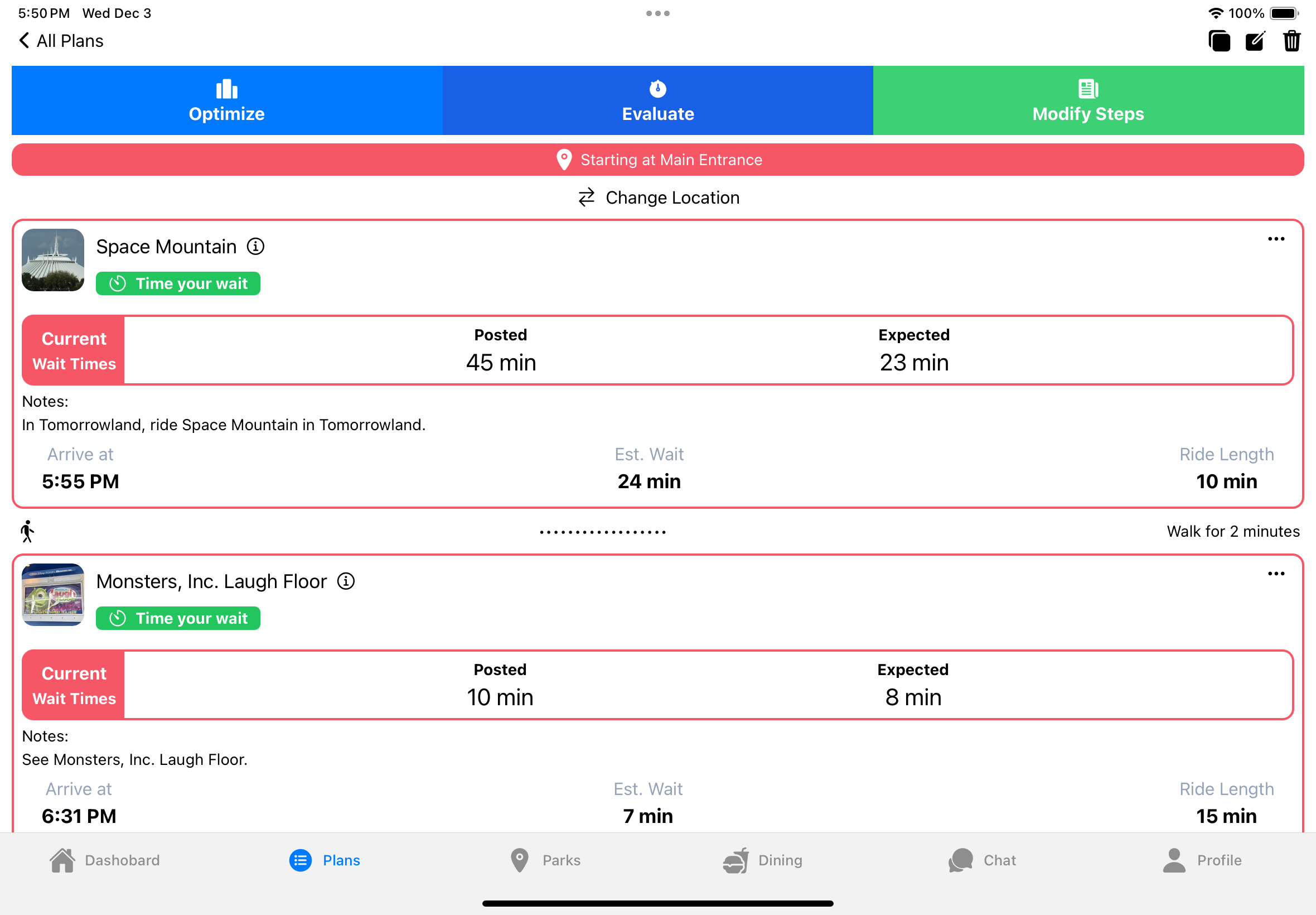
I could open the menu
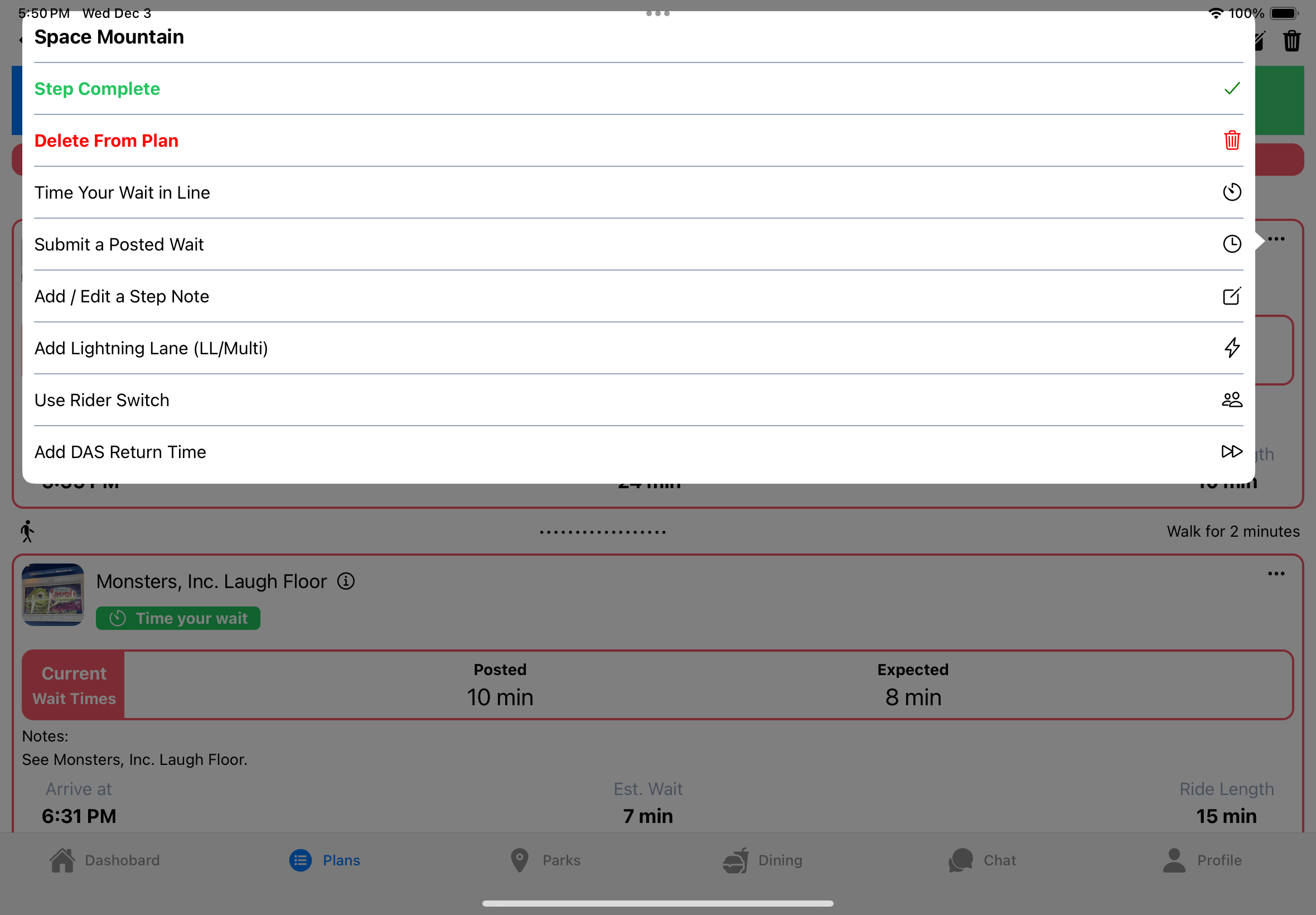
And then it removed the completed step
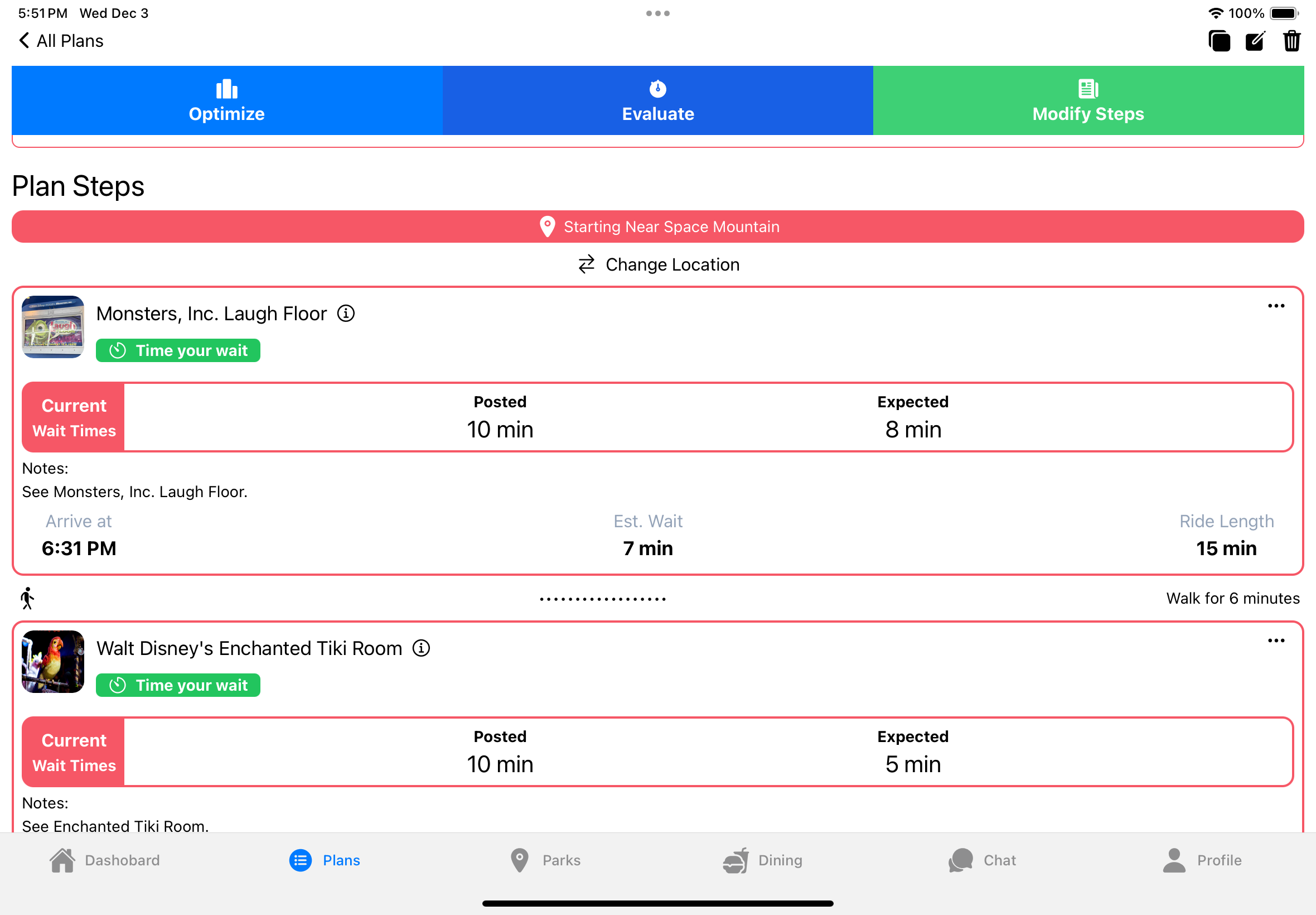
Do you think it matters what type of plan you start with? I created this on the website and modified a premade plan. Then opened it in the app.
4 Likes
Perhaps it is an Android app issue? Doesn’t change the underlying issue. Two really. One, that it doesn’t actually remove the step when marked as complete, and two, that the interface makes it extraordinarily difficult to figure out how to enter a plan execution mode or whatever it would be called.
In any case, this was a Jollywood Nights plan I started from the website (since you can’t start a party plan from the app), and then modified and refined it from the app.
Once we arrived for Jollywood, I finished steps, but had no way to mark them as complete. I then tried restarting the app, refreshing, even restarting the phone. If I marked an item as complete, it would show a spinner indicating it was doing something, then stop, and the item was still there. I tried numerous tasks, and refreshed after marking complete, to no avail.
This meant I couldn’t evaluate nor optimize because it just assumed everything was still left to do.
3 Likes
Yikes - yes - that is not functional at all. I will say my spinner spun forever and I would just refresh and it would be gone. That said, even at home on my computers whenever I optimized or evaluated, it would spin forever and I would have to just interrupt and refresh.
1 Like
2-4 sprints seems really quick for the amount of work you just outlined. You know you have your happy testers here if needed! This is a really cool analysis and I’m happy to say I think I grasp about 94% of it. Can’t wait to try on my next trip!
5 Likes