That is the kind of mistake you only make once. 
That is the kind of mistake you only make once.
Perfect! (I mean, not perfect, but … you know) This is one of the things we’re trying to fix.
There are a couple of possible things happening:
I’m mostly interested in #2 at this point. For example, if the posted wait at Flight of Passage was 100 minutes, we predicted an actual of 50, and the actual wait was between 80 and ~110 minutes.
-or-
If the posted wait at Flight of Passage was 20 minutes and we still predicted a 50-minute actual.
I’ve been looking at the way we do intraday adjustments, and I haven’t been able to rule out those two possibilities. But I also haven’t seen a specific instance of it happening.
It’s taken a while, but I’ve managed to pull out the code we use for intraday adjustments and run it after the fact as a simulation of how it acts every 15 minutes during the day. So I can say things like “Tell me how we did the intraday adjustments for Kilimanjaro Safaris on June 4, 2025” and test different changes to see how they’d compare.
That’s where having a specific example on a given date and at a given time, would be helpful.
* We can’t do a lot with #1
** We’ve seen this at Battle at the Ministry, where a posted wait of 150 turns into an actual wait of 250. The issue there is that neither I nor a typical user would believe the app if it said “Yeah, Universal’s telling you it’s 150, but trust me it’s really 250.”
I assumed we needed to refresh.
Thank you!
The good news is that our refund rate is very low - under 2%. And that includes things like “something came up and we can’t take the trip”.
We spent ~7 months (Nov ‘24-May ‘25) rewriting how we do our wait-time models so that they better represented what happens in the first few hours the park is open.
Aside from a couple of months where I updated the hotel room tool, most of what I, Fred, and intern Kinsey worked on all year was around making the touring plans as useful as possible in the parks. Tracking down specific instances of forecasting failure allows us to focus on those areas most.
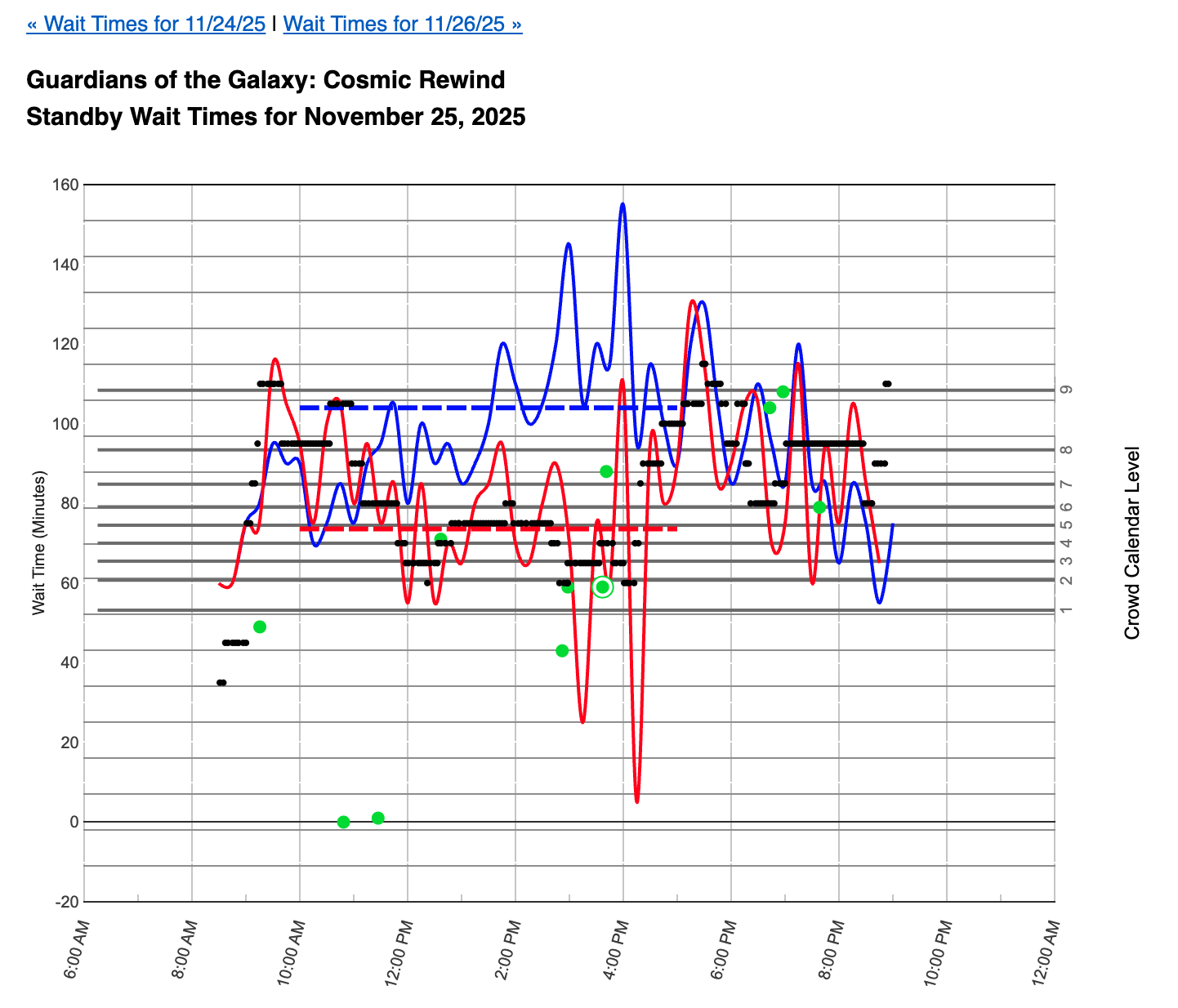
I thought it updated automatically every so often, which may have been my issue a few days ago. Last Tuesday, at 3:35 I entered the line for Guardians after seeing a few minutes before that the posted wait was 60 and the expected was 30 (as I recall). I think the posted was up slightly from that by the time I got in line. My actual wait was 59 minutes (I tried to time it and thought I hit submit, but when I came back to the app later it was still going, so I cancelled). I had also looked at the line graph of expected wait times, which showed the expected time going down during my walk-to-the-ride time. It was a great ride and I was fine with waiting—I just thought I would gamble on the prediction panning out.
That’s helpful - thank you! Here’s the wait-time graph for that day. I think you’re the green dot at 3:36 pm, since it’s 59 minutes - it looks like the ‘submit’ button didn’t disappear as it should have:
So the Guardian’s sign said 60 minutes and the Lines app said to expect at 30-minute wait? Do you recall what the Lines app said the posted wait was?
This is helpful. Thank you!
Unless you’ve learned how to update paper on the fly, we would not imagine that you could.
Good, I’m glad the wait time registered after all! Sorry I don’t remember the specifics precisely. I was a little less than a 15 minute walk away when I saw what I remember as a 60 (or maybe 65) minute posted and 30 minute predicted. I checked the line graph to see if it was predicted to spike before I could get there, but it showed the wait prediction bottoming out around the time I would arrive. It’s possible I’m off by a bit and that those were just the ballpark numbers that stuck. I do remember that the posted number was a little higher by the time I got there, but not more than a 5-10 minute rise. I had ridden it the night before during extra hours (didn’t time it) and the line was at about the same point outside, but the inside line moved faster on Monday (maybe because there were no lightning lanes?) But when I rode it for the first time on Monday, I came away thinking “I would totally wait in a long line for that,” so I was up for the relatively short posted wait.
I hardly ever use the park wait time page. I’m usually on a custom plan page and assume it requires an “optimize” or “evaluate” to update.
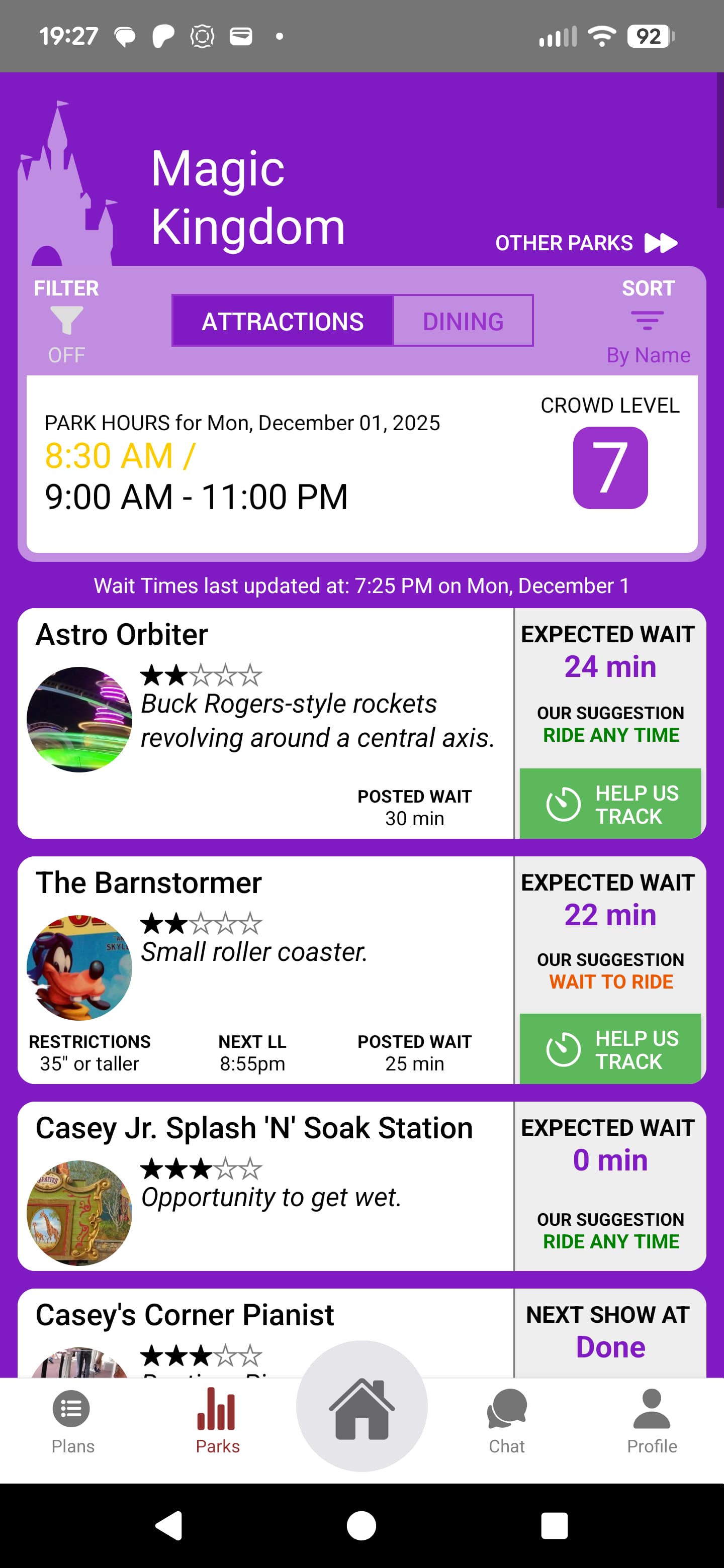
I’m guessing that’s the iPhone version? Looks a little different than mine…
That page looks the same on my Android Samsung S22. Mine looks like hers, not yours.
Interesting! I actually gave a Google Pixel!
I think we’re in the middle of updating all the apps (WDW, DLR, UOR) across both iOS and Android.
This is super-helpful. Thank you!
I always assumed the app refreshed every so many seconds.
Totally agree.
I assumed they automatically refreshed. But maybe a refresh button would be helpful if this isn’t the case.
A recent podcast trip report also pointed to inaccurate wait time for Lines.
Side note: No ride should have a zero wait time ever. It takes time to walk the queue. You should at least have a 5 minute wait built in it he plan, even for “walk ons”. This can throw your whole days plan off. I’ve learned to adjust accordingly but I know that’s not how the software is intended to be used.
Personally, I found using Lines in the past awkward. I haven’t tried to use it in the past year or so, so take my words with that in mind.
But how does that align with the fact that you start the timer when you hit resistance in the line? I have timed 1 minute waits. Wouldn’t/ Shouldn’t the queue walk be added to overall attraction time?
Great question.
We should account for the walking time in the ‘walk’ field. It’s non-trivial for attractions like FoP, ROTR and Kali. So if that’s off, we need to update it.
But the wait should just be when you’re stopped in line because other people are waiting in front of you. The idea is that a “walk-on” attraction has zero minutes of waiting, if that makes sense.
I am not necessarily answering your question but I did just get back from a 9 night Thanksgiving week trip and I had a heck of a time with the app-it was so glitchy for me that I reverted to using my online plans via my phone while in the park.
Maybe because I wasn’t refreshing?
I would update my plans on the web version before heading to the parks, but when I tried to access that plan in the app in the park, it would display an older version of my TP and not the new version.
So I’d go to access via the web and it woukd be correct.
i also had this weirdness where I’d click into my plans for a future day and it would default back to my current day (which happened to be my Xmas party plan). So everything came up with the plan for the party.
I re-installed the app at least once, but I kind of gave up on the TP app itself for our trip.
FWIW: the predicted times from the TP planning tool were also remarkably off for MK and HS on 11/23 and 11/24 respectively.
in the end it wasn’t a big deal as I had benefited tremendously from the TP planning tool ahead of time, and was using it mostly as a reminder of where we were headed next.
I could never have planned this trip without TP, so despite my in park experience with the spp, it was one of the best investments I made! Thank you.
It doesn’t. But the line walk time should be accounted for somehow, even if default by the software. Then the user submits wait time. The software would have to add minutes for the queue. It doesn’t seem like much but, especially at rope drop and the first hour of park time, can impact the overall plan significantly.
It may only be off by minutes per attraction but how can the software predict how long it will take you to walk to the point of resistance if it doesn’t really know where exactly in the queue that will be?