Alright need to do a little math. But I think I’ll be just shy of the 24 months come September. Maybe they will keep it around a couple months longer  With 100k pts, we can get to that CP with just 1 card somewhat quiickly if needed.
Luckily I did not go for the biz first last go round, lol
1 Like
Just remember to count from the month your SUB hit the statement as opposed to the card opening date!
1 Like
So I’ve been toying with a points stay in or near WDW for a bit. Looking at some of these heavily advertised “points boost” promotions has me really leaning that way. Aside from boosted options, the points redemptions via the chase portal are very good on their own, compared with direct bookings.
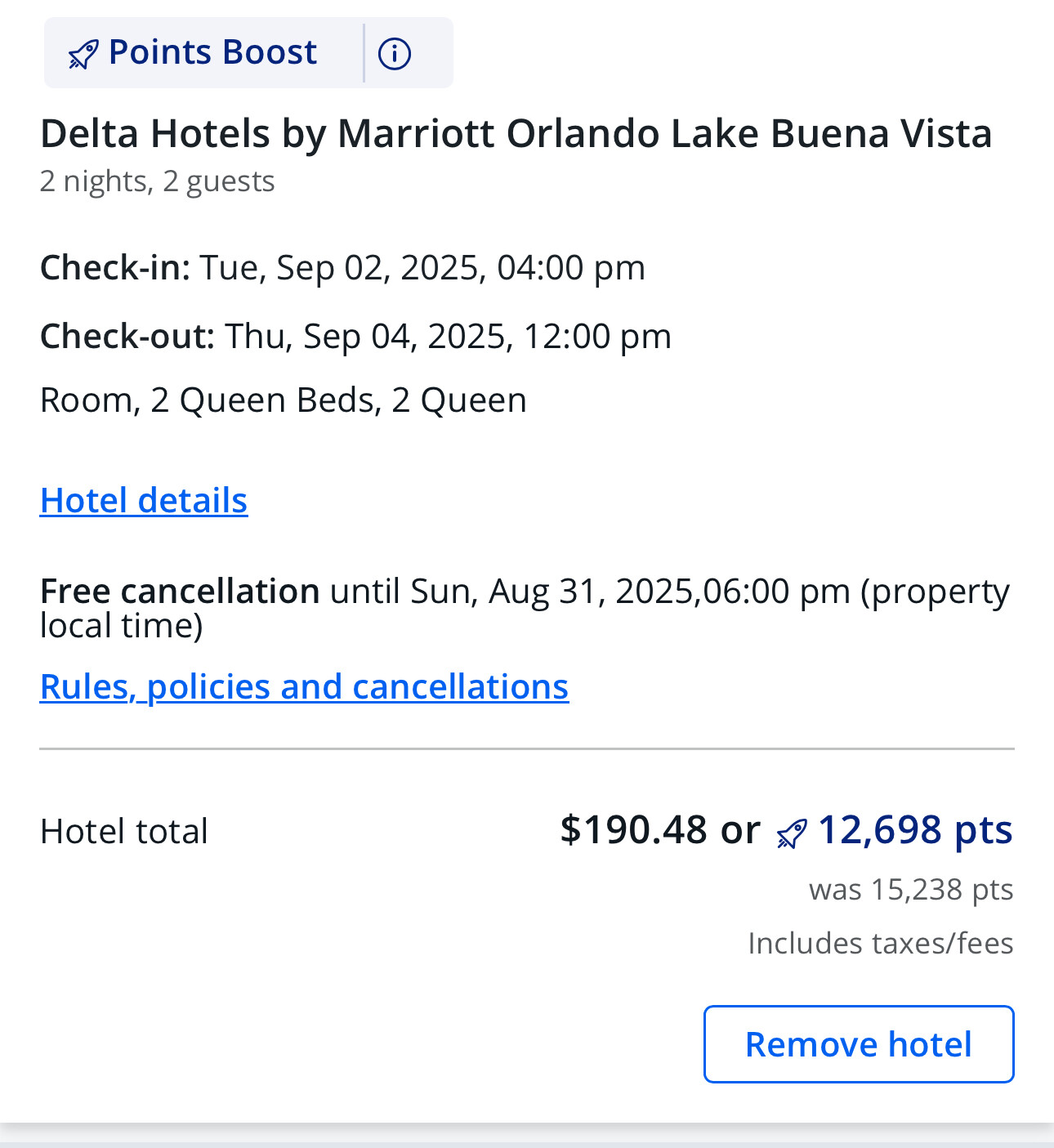
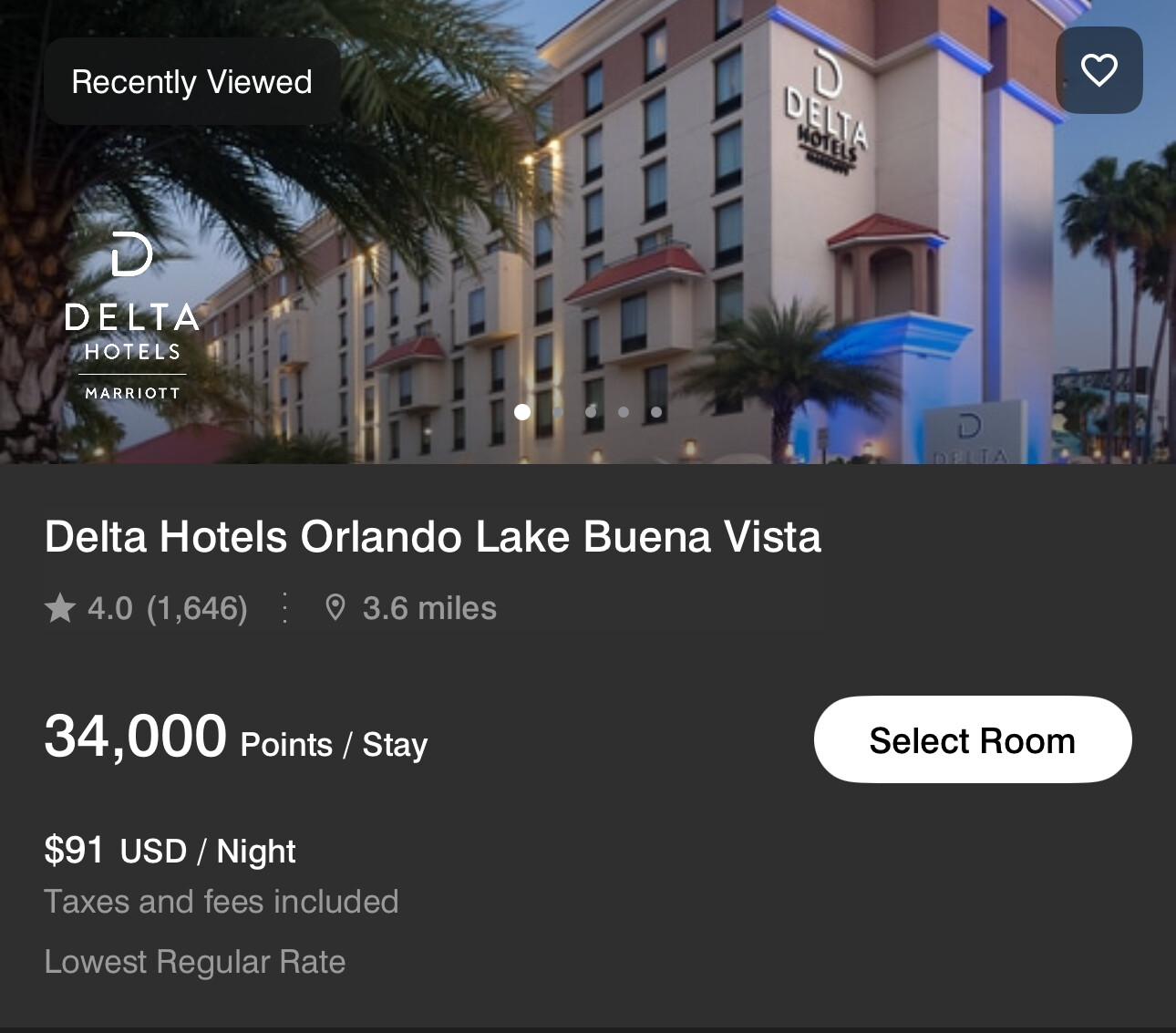
For example, I can boom the Delta Lake Buena Vista for 12,689 points, plus use my $50 credit towards it via the chase portal. Those same two nights in September via Marriott is 34,000 points.

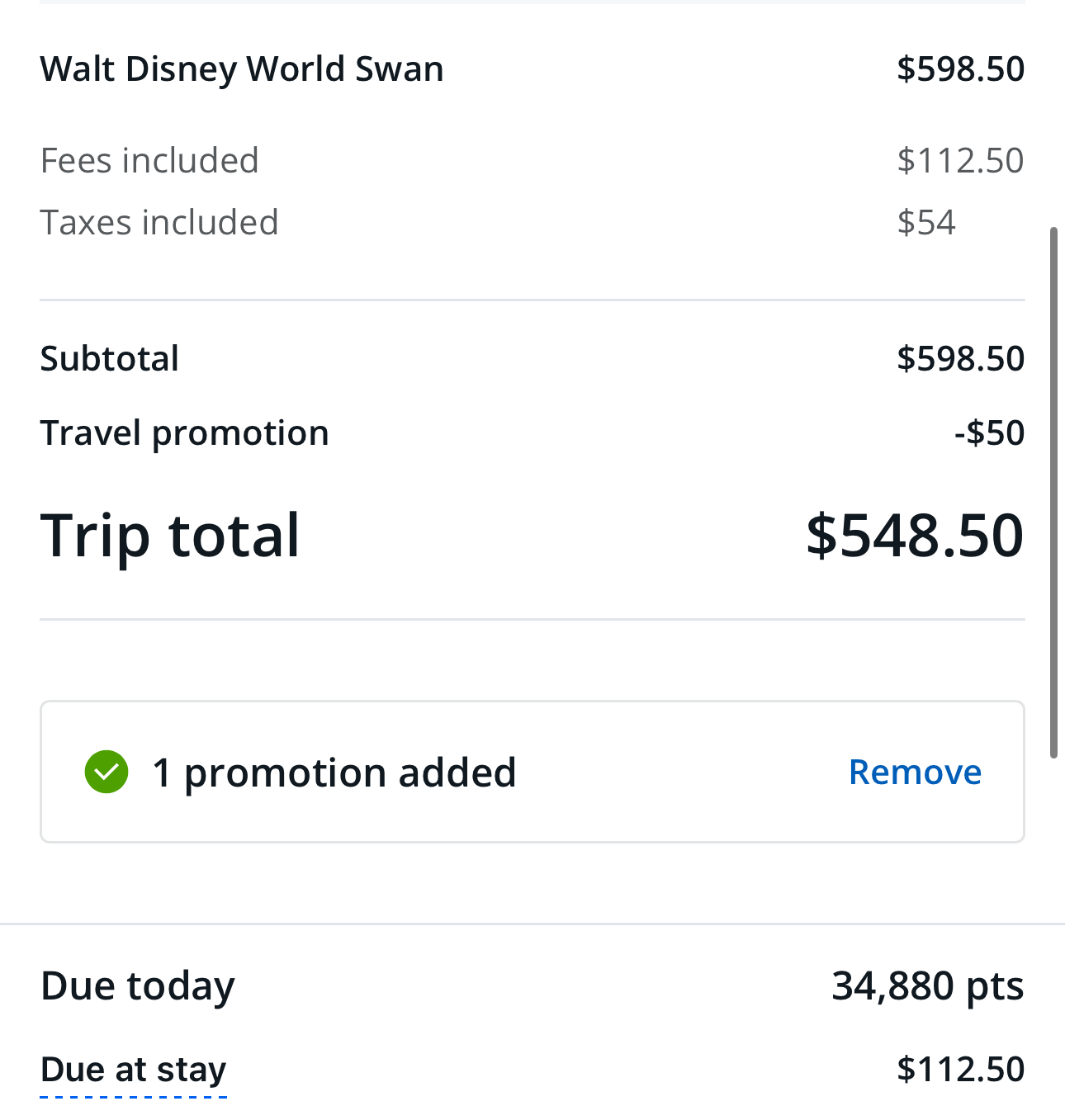
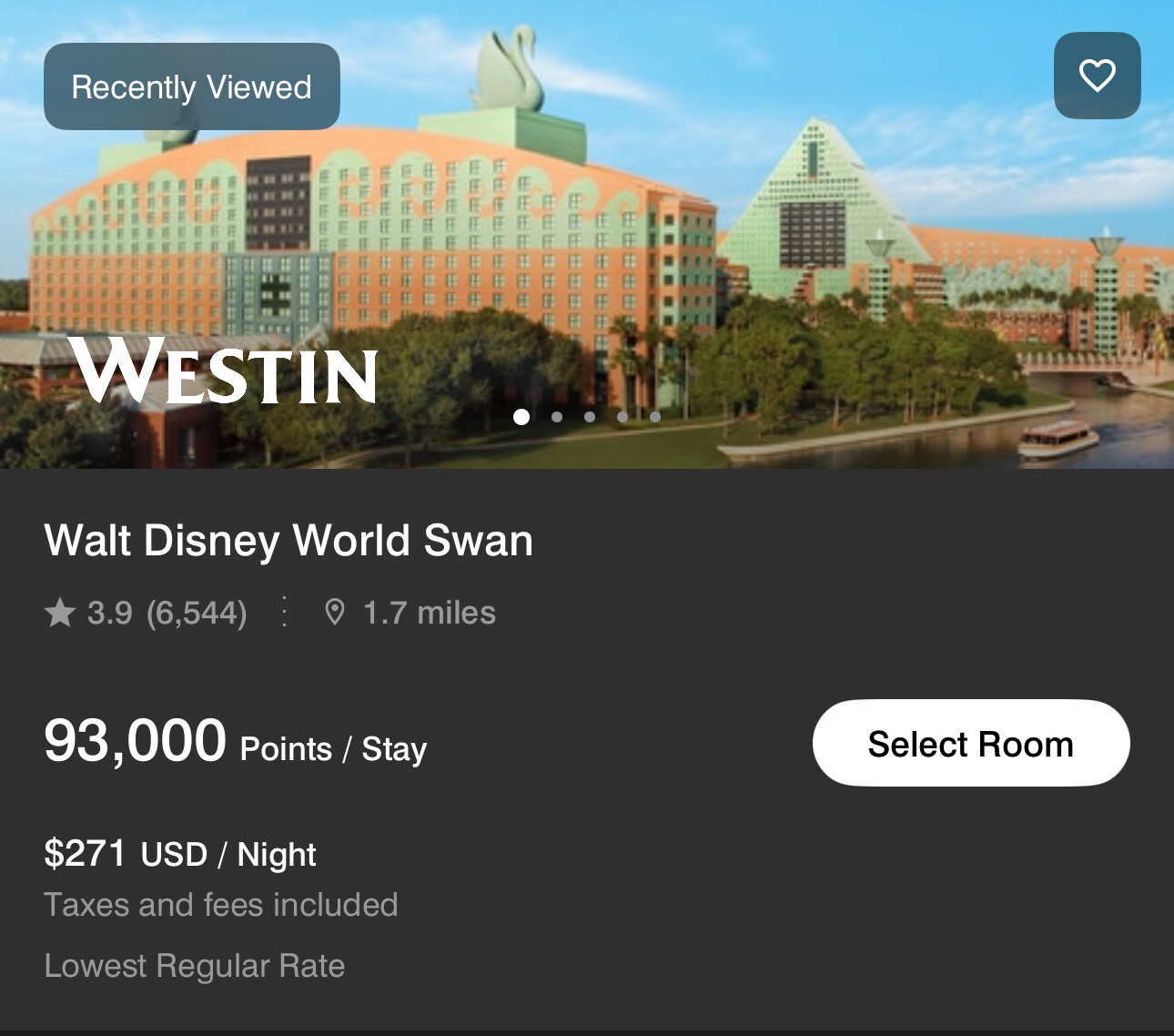
Swolphin really goes wild as through the portal it’s 34,480. I applied the $50 credit and it took it down 4k. Same booking direct with Marriot is 93k!
2 Likes
Yes. I need to check that. I know I hit the personal SUB pretty quick. The business SUB was later- well I also applied a couple months after, iirc. I think I hit that in Jan or Feb. It would be nice to take advantage of the 100000k miles to get a CP. I don’t think I’ll do it this year without it. We’ll just take a SW break and use our built up stash of AA miles if need be.
If you have a Citi card, check their portal. I snagged Swan at a great rate- much cheaper than direct. It may have been an anomaly but it’s worth checking.
1 Like
Don’t recall if we discussed this in the past or not, so just in case: the 24-month rule doesn’t really matter with the business cards, because you can just choose a different card than the one you had last time even if you are under 24-months since the last biz bonus.
(Definitely check to make sure that is still the case if it matters to your strategy.  )
)
Personals don’t have that flexibility.
2 Likes
I believe way back at the start of the thread I posted shots of my Southwest card comparison sheet - I can select different variations of personal + business card and see how all the points and fees add up.
Out of curiosity, at lunch I modified my sheet with the latest 100K personal SUB and annual fees.
It’s a busy interface, I know, but essentially, all I need to do is put a Y in the Select column and it will tally all the points and fee on the bottom right.
I manually recorded the combos I tried in the table at the bottom.
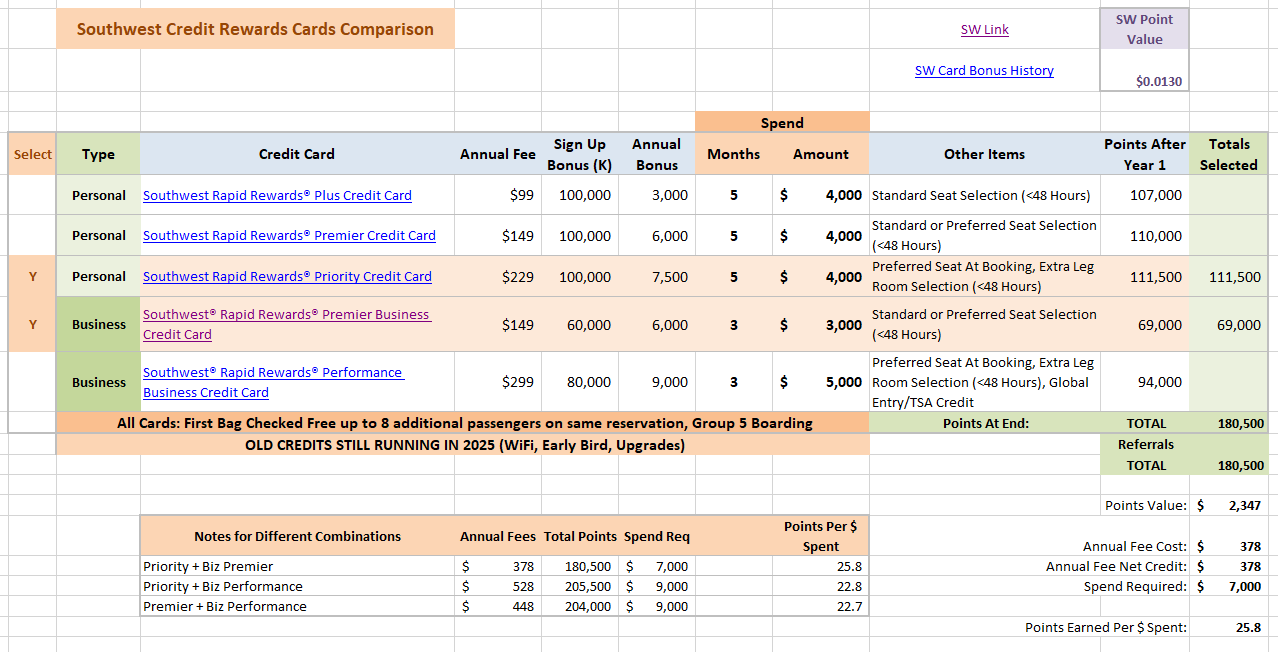
So, beyond free bags which all of the cards have, what I really want out of these cards most are these perks:
- Preferred seat selection at booking
- Good points return
- WiFi Credits
The higher cost personal and biz cards have the seat selection, so have to go with at least one of those. The possibility of Extra Leg Room selection on those are a bonus - but I really doubt there’s going to be much opportunity for that happening on many flights.
As we were discussing above in thread - the higher fees really make perks and annual points vs fee kinda squeaky tight. But, on a year earning big SUBs on both cards, that’s only a concern in year 2 - I’ll have to decide which card to drop and which I’d want to hold long term for seat selection and free bags in non-CP earning years.
And… Well, since there’s no mention of free WiFi on the Perf Biz anymore, guess that’s moot unless that somehow makes its way back into the mix. I would be super surprised if it did, but figured I’d keep it in mind when looking at the different card scenarios. If I had a tie breaker, maybe the possibility of free WiFi from the card in the future would help make a decision.
Essentially, I see only 3 card combos that do what I want.
First: The difference in annual bonus miles between any card selections is really inconsequential. When I’m walking around in my top hat next year with a few hundred thousand Southwest miles and burning any stray miles with my lit cigar, 1,500 miles between two cards choices is chicken feed.

Then it occurred to me that if SW also releases some business bonuses that allow me to get the Performance biz first, the Plus could be a good play at only $99. But for now - right out, and along with it the personal Premier is iffy since it does not offer seat selection until 48 hours out.
Long story, long: it really seems that the only real choice is the Priority to lock in the elevated bonus and get seat selection at booking + the much cheaper Premier Business to snag the remaining miles needed to earn the CP.

Without the WiFi credits or other useful perks, spending another $150 annual fee on the Performance is a non-starter. (Not going to need Global Entry credit for a few years and I have that credit on other cards anyway.)
| So, barring any double-secret Wi-Fi credit announcements, I believe my own play is going to be starting with the personal Priority a week or three before the current bonus offer expires. |

That will be the magical tuition season, so I can knock out $3,000 on that card immediately and leave enough left in the spend so that Chase doesn’t fire off an early bonus flare - as has happened to some people that fly too close to finishing before the new year starts.
Then, I’ll keep my fingers crossed that SW releases a better bonus than the sub-optimal 60K on the Premier. I do not have any early 2026 trip plans, so not really that concerned with earning the CP until later in the year, so I can try waiting them out beyond October or November before I give in and go for the regular 60K Premier.
Well, that post ended up much, much longer than I expected. Oh well.
2 Likes
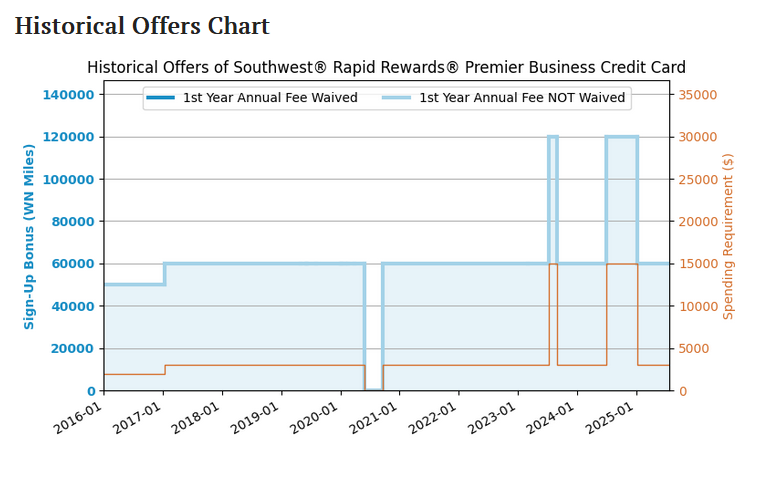
I should have checked the Premier biz card’s bonus history charts on US Credit Card Guide.
They have not updated these cards for today’s new bonus yet - but looks like the Premier pretty much lives at 60K for $3k spend - EXCEPT for two times where it popped way the heck up to 120K point SUB, but for a ridonculous $15K spend, which I ain’t doing.
So, that simplifies my desire to wait out any changes.
2 Likes
Same with us. I would like to get the CP for 2026 and 2027 since DH’s is expiring this year. But have other free* options for flights outside of SW and don’t have too many plans as of now.
I was searching for a card for DH just recently. He scoffs at large annual fees but I can convince him with usable credits (not Uber or dining things as we rarely use that). We have to put new windows on one of the properties- townhouse duplex. Muey $$$. I was hoping to find a big SUB for a big spend that made sense but ended up with the Sapphire Preferred. I needed the card ASAP and we got in the 100,000 points plus my referral. Soon we will be sitting with almost half a million Ultimate Rewards points between us! (queue evil laughter muah-ha-ha-ha)
1 Like

1 Like
Guide me Obi-Won! Does Southwest have a specific way that they count “5 months”? If I apply for this card in mid-August, does my 5 month clock start ticking once approved in the middle of the month or is it back dates to August 1. Trying to figure out if I can time this so that I get those 100,000 right at the start of January.
1 Like
They start counting bonus earning clock the day you are approved. I’d probably wait until mid-August at least so you have some time leeway in January.
Personally I’m going to wait until first week in Sept unless there is an inkling the offer is getting pulled early.
(I’ve also just started another Amex Blue Biz Plus SUB, so I need to focus on that for spend.)
1 Like
Agreed. You get approved at the end of the previous year but make sure you don’t hit your sub till the following year. That way your CP is valid that year and the next ( the remainder of the year then 1 full year is how SW currently operates with free CP).
So to hit your target in 2026, you apply for the card depending on how long the SUB terms window is. A longer SUB window with this current great SUB deal is sweet for people looking to capitalize on a CP… As long as they keep the current offer available past mid to late August since you have 5 months. But if you aren’t playing for the CP game, the 100000 points for all of the personal cards is a great deal anyway IMO. Not as great as it once was… But that’s subjective, lol.
1 Like
I should probably have mentioned: in points groups every year you hear about people that say they spent something close to the required spend amount but not over - and Chase awarded them the bonus before the person wanted it to happen for the Southwest CP.
Now, I’d bet my Liner card that a LOT of those people just didn’t realize they really DID spend over the threshold, or their P2 husband yanked out his authorized user card to buy a 24-pack of Slim Jims down at the Gas n Go and didn’t tell them.
But, being cautious doesn’t hurt - when I’m going for the SW CP, I’ll try to leave $500 unspent at a minimum, but more likely $1K or so just in case.
Since it is winter at CP season I always have a nice hefty home heating oil bill to cover, so easy for me to wait until January then finish spend quickly.
1 Like
Does anyone know if tickets purchased through Unlocked Magic codes as “Travel” with Capital One? Touring Plans led me to them as they have the cheapest ticket prices, but I need to use the points eraser on my Venture card, so have to be sure the purchase codes as travel. THANKS!
1 Like
I had never heard of them - but just looking it appears Unlocked Magic is a DVC Rental Store sister site.
So, I would tend to think they’d code as travel if they are the same, but when I used the Award Wallet lookup tool UM did not show up at all.
(That lookup tool is is not 100% accurate, but pretty good indicator, FWIW.)
DVC Rental Store appears in that tool as coding as travel in most cases (sometimes “Timeshare”) so I’d tend to think UM would too, but just found this recent DisBoards thread where someone reported it came in as “Office & Shipping” which is 100% bizarre.
“The tickets were purchased with a Chase card and the one “bad” thing is that purchase coded “Office & Shipping” not “Travel” or “Entertainment”. So it won’t trip the Chase Freedom “Select Live Entertainment” nor will it give 3% on a Chase Sapphire Reserve. However, it might be good if you have a Chase Ink Business Cash since it gives 5% back on Office Supplies.”
1 Like
Thank you so much for the detailed reply! Sounds like it should be okay, but not sure I can risk based on this “office & shipping” code that was reported, unless I get more information. Thanks again
2 Likes
My pleasure! I agree, with that “Office” report I’d be out too.
Simple answer is that Undercover Tourist codes as travel, even if they are a few dozen more $ right now, I’d probably go that way since using the points is saving a good amount of money.
1 Like
This doesn’t really fall under the topic at hand, but tangentially is about getting deals so going to drop this here anyway.
PSA: Do not bother with ads in Instagram.
Even if they are legit, you can usually find the same product cheaper somewhere online.
But, in reality SO many scams - and they are really good at using your IG history to target people.
| I’ve clicked on a few legit RSVLTS shirts posts, I like their Mickey shirts but I’m waiting to see if they ever have a good sale, because not a fan of the regular $70 price. |
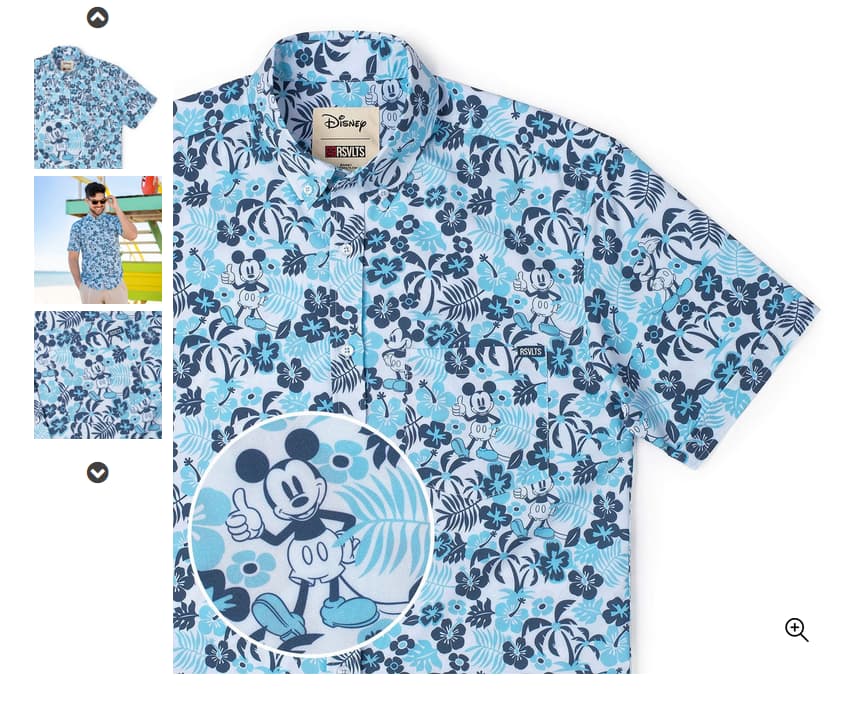
Today I was fed the ad below -
- First, NO company is going to have a 90% off sale on what are probably their most popular product, especially selling a $70 shirt for $2.99.
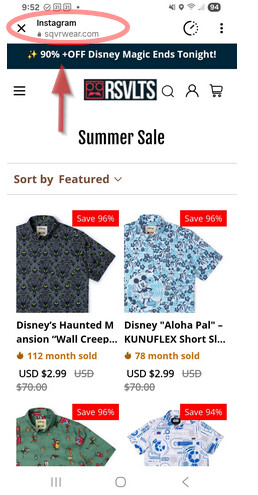
But, even if they didn’t make the scam so obvious -
- Always check the domain URL: this one is obviously not RSVLTS.com.

Gonna go out on a limb that a score of “1” is not the good end of the scale.
If you run a quick WHOIS on the domain - it was registered a few weeks ago in… who would have guessed?:  China.
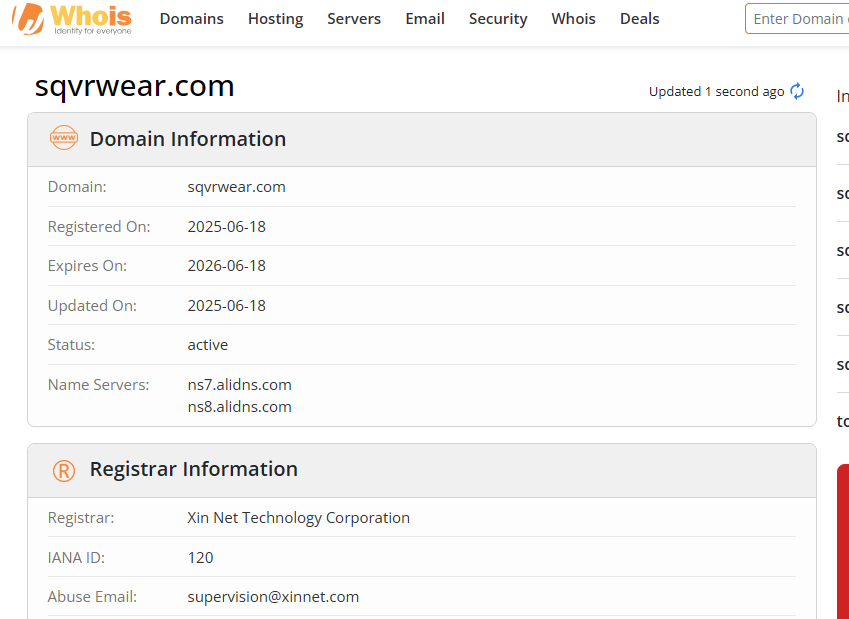
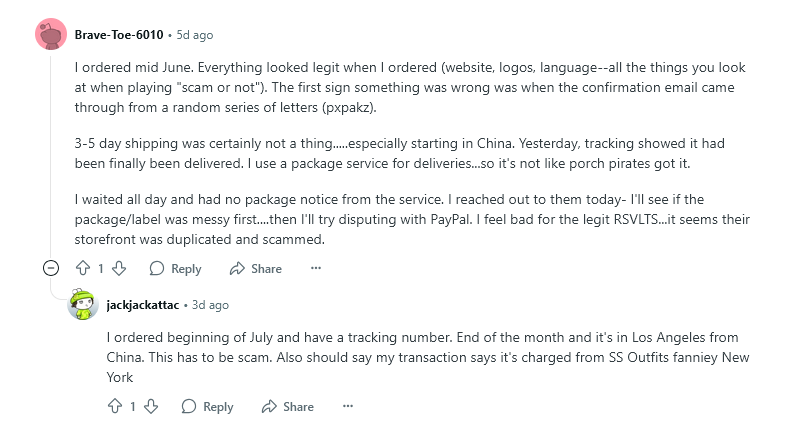
I had the same thing happen with Boston Scally caps and a few other products - they make the ad a duplicate of the legit one and just hope that people pay zero attention to any of the things I mentioned.
and they do, as you can see in this reddit thread:
2 Likes
I always go to the store site to buy vs clicking through on FB. Not that I buy a lot. Also, you can use Google Lens to find all the sites that are selling the product. I generally do this for any miscellaneous product purchase. You can get reviews this way as well.
1 Like
I saw that a few weeks ago and I shared a link for a couple of shirts to my wife, and it pulled up a totally different site on her phone.
2 Likes