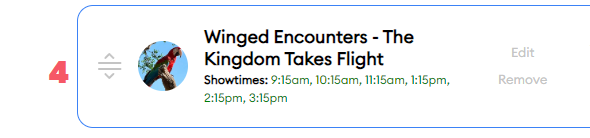
Also @david The Winged Encounters showtime at AK is :15 after the hour. Within my touring plan it is :45 after each hour. I believe it wasn’t changed from an old schedule.
Thanks!
Also @david The Winged Encounters showtime at AK is :15 after the hour. Within my touring plan it is :45 after each hour. I believe it wasn’t changed from an old schedule.
Thanks!
Thanks! If you notice anything like that, please submit a ticket via our Help Center (https://help.touringplans.com/hc/en-us/requests/new). That makes it easier for us to track things.
We actually were not tracking “real” showtimes for Winged Encounters, although we would show some times for distant plans. It looks like Disney is publishing real showtimes for it now, so I’m hoping we can track those better moving forward. Check again in a few days.
Will do.
It’s fixed already, thank you!
I spent a lot of time on the desktop version for my trip planning and I didn’t find anything unusually clunky as far as white space goes. I did very little on mobile though. I did notice the plans seemed to take forever in desktop mode to “refresh” after optimizing or evaluating. I almost always had to refresh my browser. This didn’t seem to be happening on mobile though.
Also, under my trips-- crowds and plans, I would like to see a link or a show of what personalized tp’s I’ve made for those days. I see I can make a plan but it would be nice to see what I have already done in that section.
Yep, I think this is one of the big issues of the new site. Seems like a bug.
After editing a step, you either have to refresh then evaluate. Or evaluate then refresh, otherwise it keeps spinning.
I think order changes of steps is fine, it’s when steps are edited with a time change etc. Although I haven’t tested properly when it does and does not happen.
I’d say only 25% of the time it evaluates successfully.
I just refresh now after about 30 seconds. I also don’t like how the numbers on the map disappear, either after moving a step or if you let it continue the refresh process. Either way, I have to manually refresh my browser to see the numbered steps on the map.
Yes! I was going to bring this up to @len too. It used to be that the steps from the plan were on the map on the screen where you can edit/optimize/evaluate. But now you can only get that map with the numbers on the published link for the touring plan. Any way we can get the numbered steps on the park map on both screens again?
You can get it on the “modify” screen I’ll call it. But after you evaluate or optimize it seem you also have to manually refresh your browser then the numbers on the map appear. But if you move anything or reoptimize/ reevaluate they go away again.
Happy to look at these. If y’all don’t mind, please open a ticket so we can ensure we’re tracking everything (and add screencaps if possible, along with the device and browser you’re on): https://help.touringplans.com/hc/en-us.
At least some of the stuff we’re seeing is specific to very limited combinations of browsers and devices, which is why we’re asking for that info. I suspect these are more common, but let’s be sure. And thank you, all of you, for doing this.
If you have a custom touring plan for a destination and date that aligns with one of your trips, you should see that plan listed underneath the crowd levels and hours for that date.
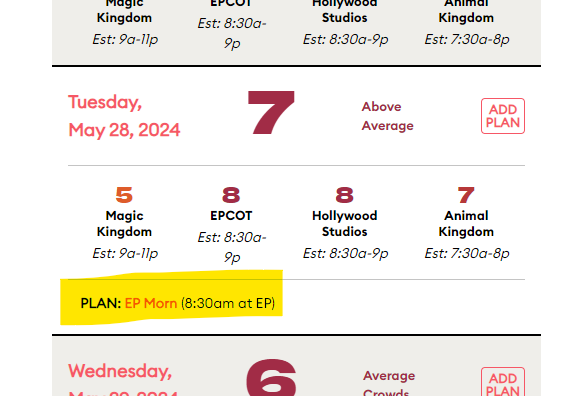
Thank you! I could swear these were not here over the weekend. Maybe it just looked different/ less obvious on desktop. On mobile I see it now.
Thanks! I was about to submit a ticket, but it looks like it’s already been fixed. 
@FelisLachesis can you specify what versions of Android and Firefox you’re using? And is the experience any better with Google Chrome? I don’t see this display issue for Guardians of the Galaxy on Firefox 121.1.0 on my Android 12 phone that’s a couple of years old.
Hi hi! Sorry. I was busy in both Florida and California the last couple of weeks!
Firefox version is 121.1.0 (Build #2015996455), 62d5117f79+
GV: 121.0.1-2024010 in8143603
AS: 121.0
Android is version 14, the January 5, 2024 security update
5.10.177-android13-4-00003-ga7208022a7ea-ab10815828
#1 Fri Sep 15 16:40:54 UTC 2023
Thanks for the follow-up. I’m not sure what would be unique about Firefox on Android. I don’t know whether it will help, but some minor Googling led to this reddit article:
https://www.reddit.com/r/GooglePixel/comments/qz6sf9/chrome_is_not_showing_some_sites_in_mobile_view
The scenario is 2 years old, but maybe it still is relevant:
In chrome on your Pixel go to chrome://flags/ search for Reduce User-Agent request header and change it to enabled. Relaunch the browser and check the pages again.
If you have a moment to see whether the experience is any different in Chrome, please check that you.
I just checked in Chrome, and that’s fine. There might be a setting in Firefox or something causing this strange layout issue