When you select room only are you also going back to all resorts?
2 Likes
At what price??
2 Likes
Yessssssssssssss this is the way
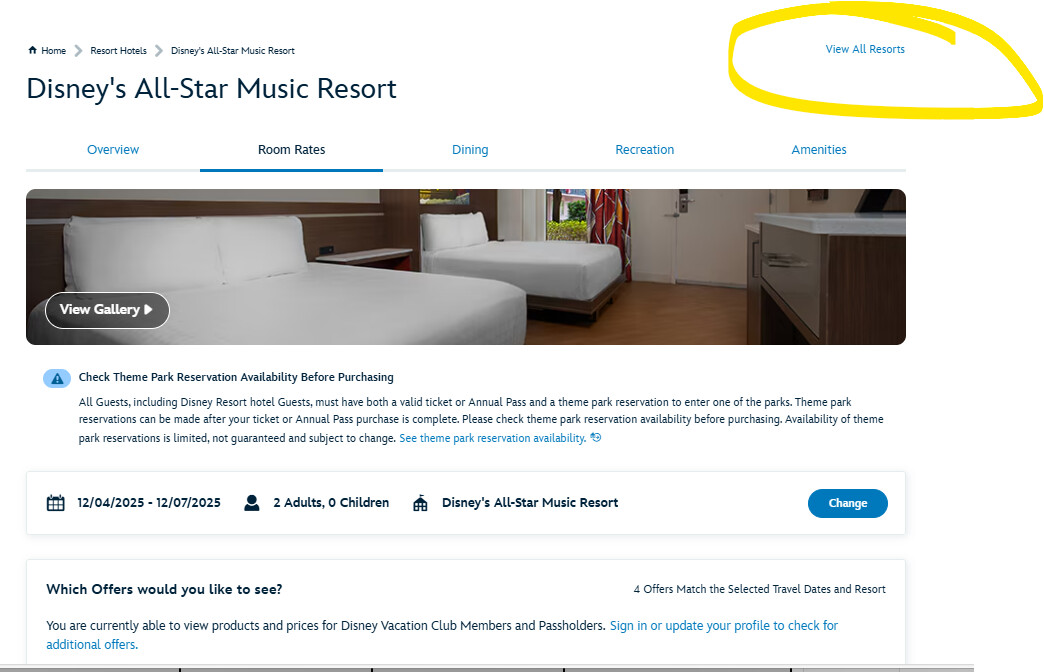
You have to apply the filter (room only) and then way at the top click “View All Resorts”
2 Likes

1 Like
When I change the product to room only, my results look just like Jen’s list.
2 Likes
That is a DISCOUNTED PRICE
You can see that it is because next to the 1473 is a green price tag and next to that is the RACK RATE
Click into that rate, change the filter to Room Only, Scroll up and select VIEW ALL RESORTS and bang you’ll see every room availalbe at rack rate
GAH! Are ya’ll trying to make me cray??
2 Likes
It wants to hold on to whatever filter you’ve applied initially —– even if you leave and come back later.
1 Like
I had the stupid little popup chat box covering that when I looked, lol.
2 Likes
$1400ish
1 Like
Discounted price 
1 Like
And God know what that is sometimes, lol
2 Likes
I’m also on my phone 
3 Likes
I have never in my life seen that many prices for a date. 
2 Likes

All I can tell you is I’m on the regular Disney site
I used the dates that Ryan himself shared (and posted them in my screen shot in case that was a question)
And set my filter to Room Only
I would doubt that many of us are typically willing to pay the rack “Room Only” rate. We are eligible for discounts, and we take them.
However, as we all know, discounted rates are for a limited number of rooms in a limited set of resorts, and when they are sold out, they are gone.
So at this late-ish date, if Ryan wants insurance (and I still don’t think he needs it), he will have to suffer with Room Only rack rate and he will like it!
4 Likes
Sorry I’m at work so my response was not fully baked. I’m not questioning your results - just lamenting that I apparently have the same bad luck Ryan does when looking for rates.
1 Like
I get the same results. 21 hotels/villas have rooms available. The most expensive “from” price is Riviera at $1405.33 avg/night.
PC laptop using Chrome. And I’m no TA.
2 Likes
I feel like these screen shots are a great illustration of why the “rate” filters are incredibly dumb. (Was this posted in another thread?) $250+ is a HUGE percentage of the results. They either need to add more or make the existing tiers bigger.
4 Likes
It’s not as plain as it could be.
If I just open the browser and put in my dates, I only get $1400 Coronado.
I then pick it.
Change my rate to room.
Then change my selection to “All Resorts.”
Then I can see what Jennifer sees.
I thought the point of that thread was anything UNDER $250. 
Now I have to ask myself if the rates I was checking other times were filterless.
3 Likes
It’s so crazy to me, though.
Rates should be one of the last things you filter after dates.
The fact that the dates picked the filter made it so just one option seemed on the table.
If I want to stay at All Star Sports, for example, the only option for me is Rack Rate. (I wonder what the deal with with GA residents getting a special rate. That seems so random.)
1 Like
It shouldn’t surprise anyone that Disney IT is not super slick 
Also, I guess from their perspective they are trying to give you the best (discounted) rate. But because it’s not slick, you end up filtering out a bunch of options if you don’t go through the process of resetting the filter(s) to maximize what you can see for options
2 Likes