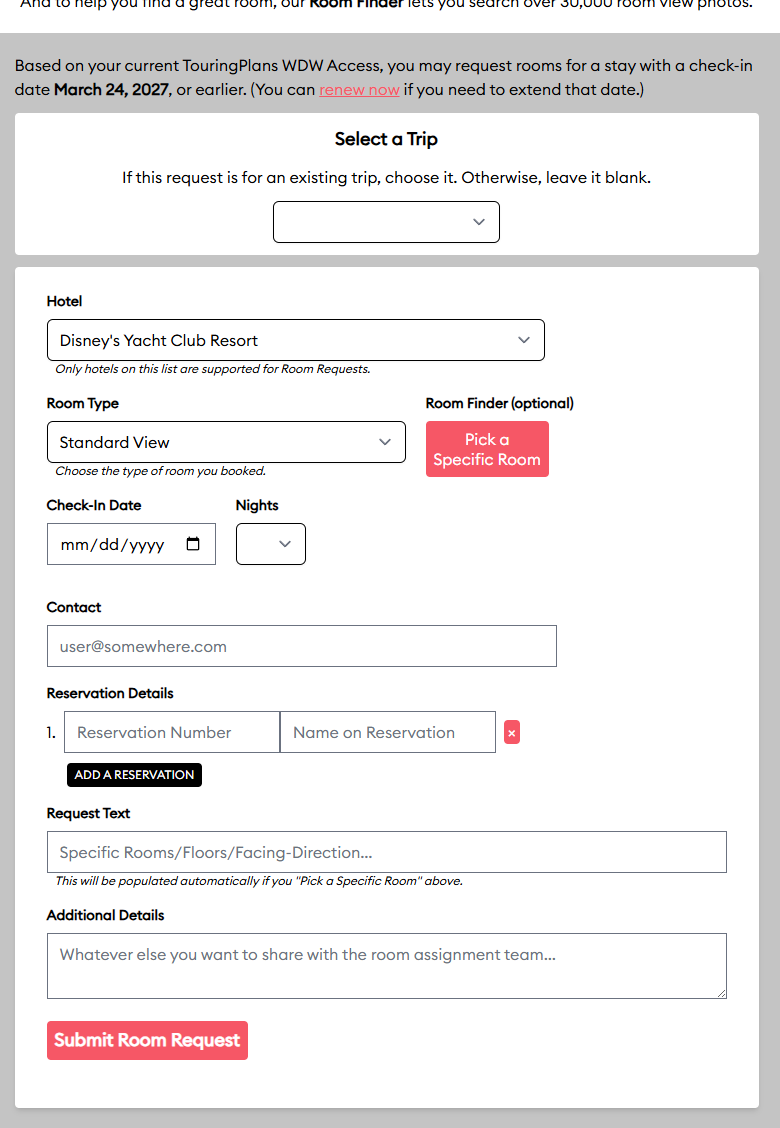
One of the features that we’re proud of on the TouringPlans site is our Disney World Room Request tool, and we’re looking for ways to make that easier and more useful.
One change I mocked up is a single-screen Room Request screen that we could use to submit room requests without having to go to through the current multi-step process.
Using the attached mock-up as a starting point, how can we improve upon the Room Request tool? (Ignore design elements like colors, fonts, etc. for now; I’d like to think about features first.)
One thing I’ll note is that I expect the new interface to allow multiple reservation numbers per request (for those with multiple rooms), and we’d also allow multiple requests per “trip” (for those with split-stays or parties with different dates/hotels).
Thank you @david for asking for feedback. The room request/finder tool is one of my favorite tools.
I think this is the most requested feature on chat. Many liners book multiple rooms.
The mock up seems to have all the information/features but I am struggling understanding how this new tool will work. Will it still be linked to trips set up on your dashboard? Or will it be completely separate? These days, many users cannot find the tool since the links do not look active:
I know I can edit my trip by clicking that text, but many users need help with that.
Looking at this revised tools, and knowing the current process, I am trying to understand where there would be fewer steps. You will still need to add the same information? (Confirmation, name, email, additional text….) Are specific rooms now optional and that is a step not everyone needs to do?
Also, if you can now have requests for multiple rooms, should there be a place to note you are traveling/connected to another reservation?
Finally, have you, or can I link this thread to chat? Thanks!
Please feel free to share this topic with Lines Chat or others you think can contribute.
It’s simpler because the Room Request would be a single page to fill out, but people still need to find it. I welcome feedback regarding where we should link the Room Request form (in addition to the dashboard)
There are fewer steps because you do not need to go to your dashboard, click on the Trips tab, and create a trip before creating the Room Request. You also don’t need to go through the Room Finder and pick a room (although you can choose to do so).
People can input multiple reservations if they want those reservations to be impacted by the same request. Whether that’s because I have two rooms for my own family or am traveling with my neighbors should not matter: you state that you want rooms near each other for whatever reservations are included. We could make more of the details (like room type and dates) reservation-specific (rather than request-specific) since those could vary.
Your point about the existing dashboard links not looking active is valid, and changing those colors would be relatively easy.
This was a complaint I had after the change to the new style for the website…having gray text for clickable links. Grayed out text implies that it is NOT clickable. So it would be nice to finally have that addressed by changing the color/look to make clickable links far more obvious.
In the new layout you are proposing, I think having two clickable links would be preferable to showing the text boxes to manually enter a room versus the button. One clickable links would be to configure room request using room finder, and the other would be to manually add room request. I am not sure I like the text “Pick a specific room” because the room finder tool isn’t necessarily about finding a specific room, but wanting to specify details for a room preference where a specific room may be an example only. I may, for example, say I want a North facing room that is on an upper level, such as room 7152, and not necessarily that I want 7152! specifically. Hope that makes sense.
App users will still need to add their resorts on the website (on their dashboard) and can only see one trip on the app but if the form is linked to the homepage it would help all these users that ask how to do it by posting in chat.
Nice improvements David. I’ll echo what others have said already: we get a ton of question on Chat about how to do this, where to click, why they can’t do it from app. Changing color of clickable text from grey will help. A link in Chat menu would help. A link to the instructions might help too. In Chat I frequently link the instructions for how to request a room. I find it at TP blog and it really gives great step by step instructions. Ideally though this wouldn’t be so complicated that it needs multiple pages long blog of instructions.
Maybe a note of instructional text warning people that configuring a room request in MDE when doing online check in may override the Touring Plans submitted one
Agreed. It’s not just that they look un-clickable. They don’t stand out on the page, and I didn’t even see them at first. I had to go to a tutorial to discover that the text I needed to click on had been right in front of me the whole time. Of course, maybe that’s just me!
It’s not you. The standard for links is that they need to look like clickable links, and not grayed out because that’s the standard for disabled links. That’s user-centered design at work, or lack thereof in this case.
Hi @burfe1501 , I just saw your follow up question. You are asking about the new room finder? Here is a link to the thread about that new tool and the testing/changes made
I am sure someone will correct me if I am wrong, but I believe you wanted to know if you want a high or low rating on sound levels. I believe if you want a quiet room, you want a low number.
Also, you need to change your filters from top down.
This is great! I really like being able to add multiple reservations, that the room finder is there and optional, very convenient placement. Also being able to add the additional notes was always confusing before, sometimes I had to do the room request then submit, then go back to add main request. This one step approach will really simplify things. Thanks!
The first post on this topic (scroll to the top) has a screenshot of a proposed Room Request screen. I want to use that as a starting point for feedback; my goal is to clear-up specifications for a new, easier way to make WDW room requests.
To be clear, this is just a static screenshot–we do not have an interactive test version of this that you can experiment with, so you cannot click the menus or anything like that: it’s just a image to look at.
I have adjusted the display of some links on the dashboard so that they look more like links. That’s unrelated to the “New Room Request Form” project that’s in the works, but it should help those using the current dashboard.
If you have any more suggestions for the room request process, let me know. Although plans can change, right now I’m planning to have that new form (and all the back-end logic to make it work) implemented before the year is over.
Also, I’m planning to have a more direct way for folks to tell us how well Disney met their room requests. Like we’ll actually display the old request and ask you what room you stayed in and to what degree you feel that aligned with what you asked for.
Thinking about that made me realize that we have not received too many “The front desk didn’t have my request and had never heard of TouringPlans! You’re running a scam! Give me my money back!” messages recently, so maybe we’re doing a better job of setting expectations (I don’t think we’re doing much differently in that regard), and/or Disney is doing a better job of granting requests.