I was playing around with an Epcot day for our August trip and enabled the LLMP feature. But the times it recommends don’t align with when the plan suggests we ride. And one it creates a time for a LL, you have to delete them in order to optimize again, otherwise it just keeps the old times. I also had issues with it not always letting me set a LLSP.
I actually usually manually configure LL times. I optimize without LL and then go into the advanced settings to allow me to input specific times I think I can get and reorder the steps, then evaluate. Repeat until the times line up.
Unfortunately I have found using the automatic LL feature is buggy as well.
Ultimately, what I EXPECTED was that if I have a list of attractions I want to do, and I select LLMP, that when I Optimize, it would suggest the most ideal LLs to use as your starting three. I would then expect that the optimized plan would actually UTILIZE those particular LLs.
Instead, I DID end up with some LL recommendations, but then it would immediately give me a warning that one of the LLs won’t be used for whatever reason (no seeming advantage to). So, then, why did it choose for me that as a LL??? And the LLs that it did recommend, the times in the plan would be at completely different times. So, for example, maybe it says I should get a LL for something at 6 pm…but then in the plan, it will show that I’m going to ride the ride at 8:30 pm. I would have thought either the ride would have been for sometime in the 6 o’clock hour, or it would have recommended a LL for 8:30 pm!!!
The other issue, as I mentioned, was that I would tell it that, for example, I wanted to use a LLSP for GotG. It would seemingly accept this, but then after optimizing, there would be no LL listed for that ride. But another time, it would work.
Alternatively - a little different from suggesting the ideal initial LLMPs:
I would specify that I want certain rides to use LLMP, and that would happen no matter when the rides occurred in the plan. That would help me determine what times I would need to reserve.
So basically, the scheduler wouldn’t use the standby times for that ride at all in its calculations, only the LLMP times.
(Note: I almost always make TPs on desktop, so I will try the latest app to see if it works differently. I also don’t remember if I tried auto LLMP this time or went straight to the method @Jeff_AZ shared.)
Lines app on iPhone (up to date - last update pushed 2 months ago)
Epcot morning with LLMP on Monday 4/20 from 9:30am-3pm - let the optimizer select times (just clicked the slider to turn LLMP on).
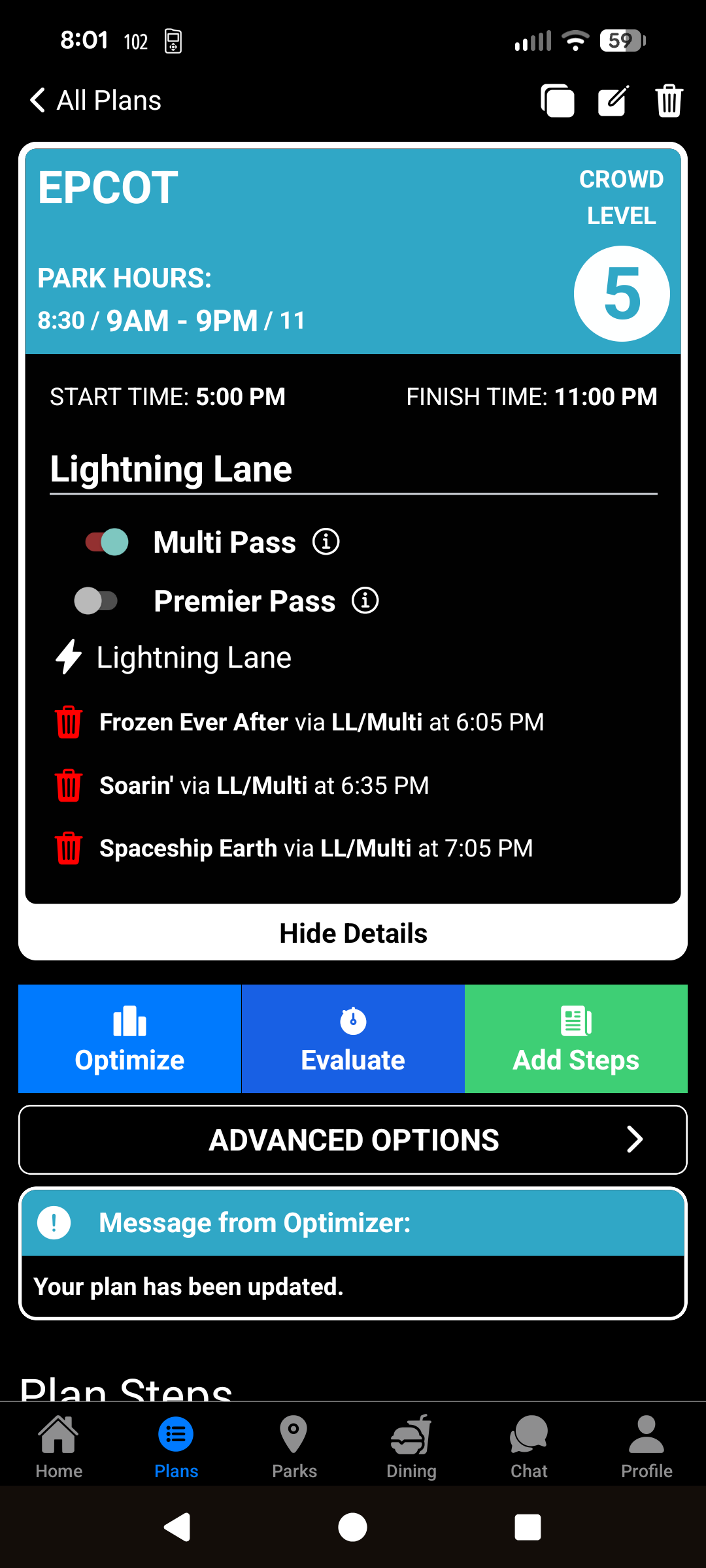
Optimizer selected:
FEA 9:35 AM
Soarin’ 10:05 AM
Spaceship Earth 10:35 AM
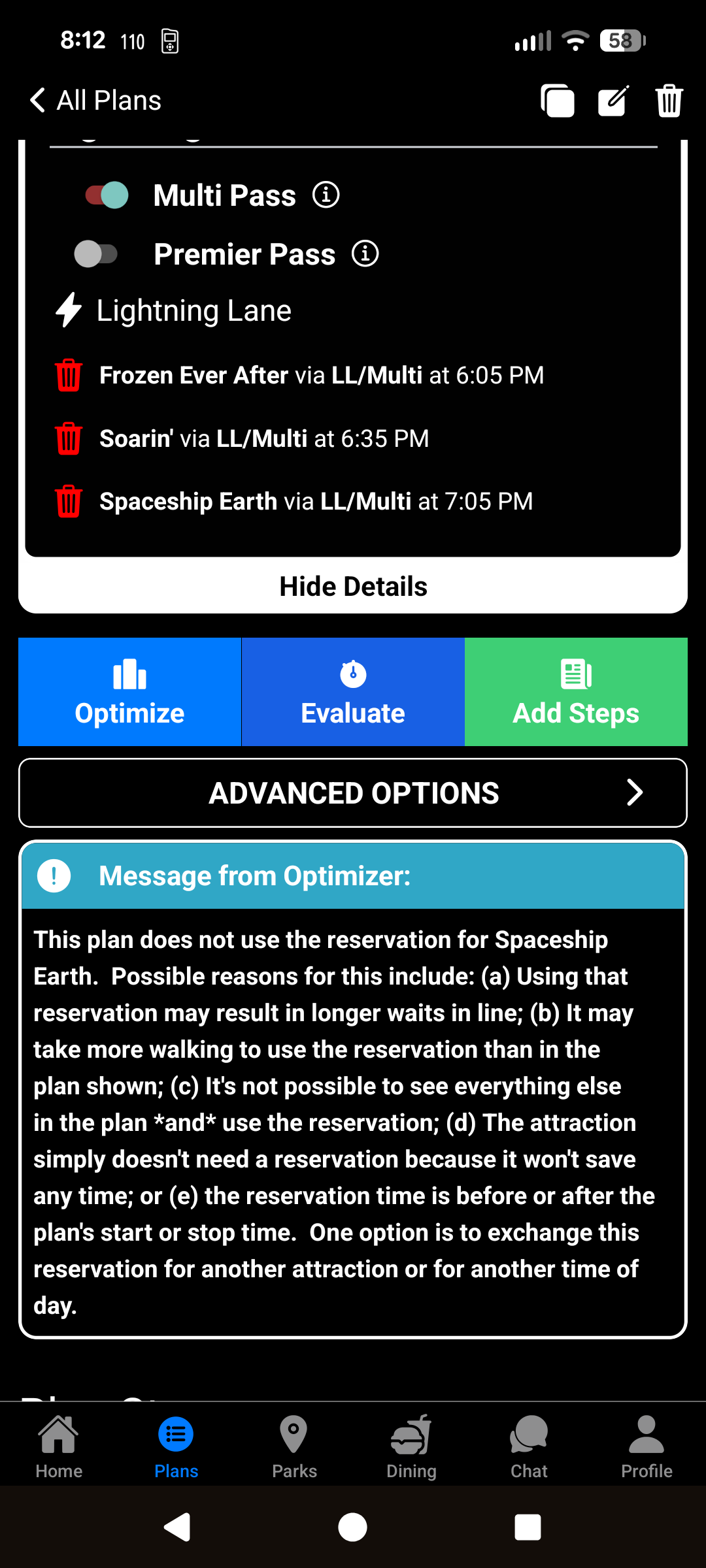
Optimizer also had a note: “This plan does not use the reservation for Spaceship Earth…”
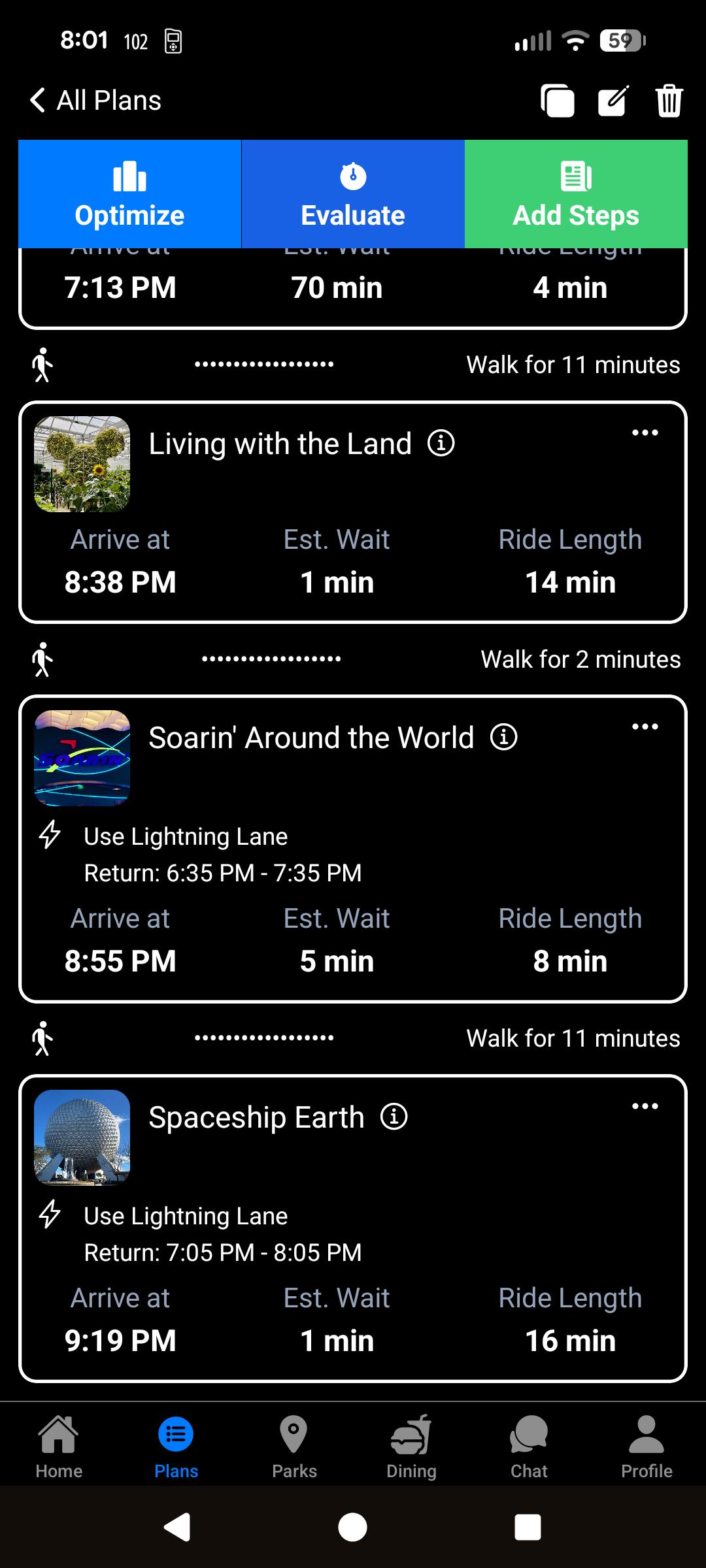
The optimize has Spaceship Earth at 2:10 pm with a 23 minute wait - so I would have expected the LL to be set for something like 2pm? Also, the plan doesn’t arrive at FEA until 11:54am (in the grace period, so still applied).
Is the Optimizer just putting the Tier 1 as early as possible, and then the Tier 2s 30 min + 30 min after that?
Other notes from creating a plan on the app for possibly the first time:
It was confusing that LLMP and LLPP were at the top as sliders but LLSP (for Guardian’s) was a 3 dot option on the plan step only.
LLMP is not an option under the 3 dots until Force Use of Inputted Return Times is enabled and any previously set LLMP time for that attraction has been trashed. I would have liked it if the 3 dots option were available anytime Force Use is enabled, so that it also could update a previously set time.
It was really confusing trying to figure out how to move steps around to evaluate. Clicking the Optimize button immediately optimizes, so I assumed that clicking the Evaluate button would also immediate evaluate (which I didn’t want to do yet, as I hadn’t figured out how to rearrange - I was trying to drag in the plan). Eventually, I pressed it because I didn’t know what to do, and it enabled changing the steps. Now that I know, it’s okay.
I couldn’t figure out how to share the plan on the app. I went into my dashboard on the website and published it there.
Enhancement request: could the app get a mini map showing the step numbers / locations, like on the website?
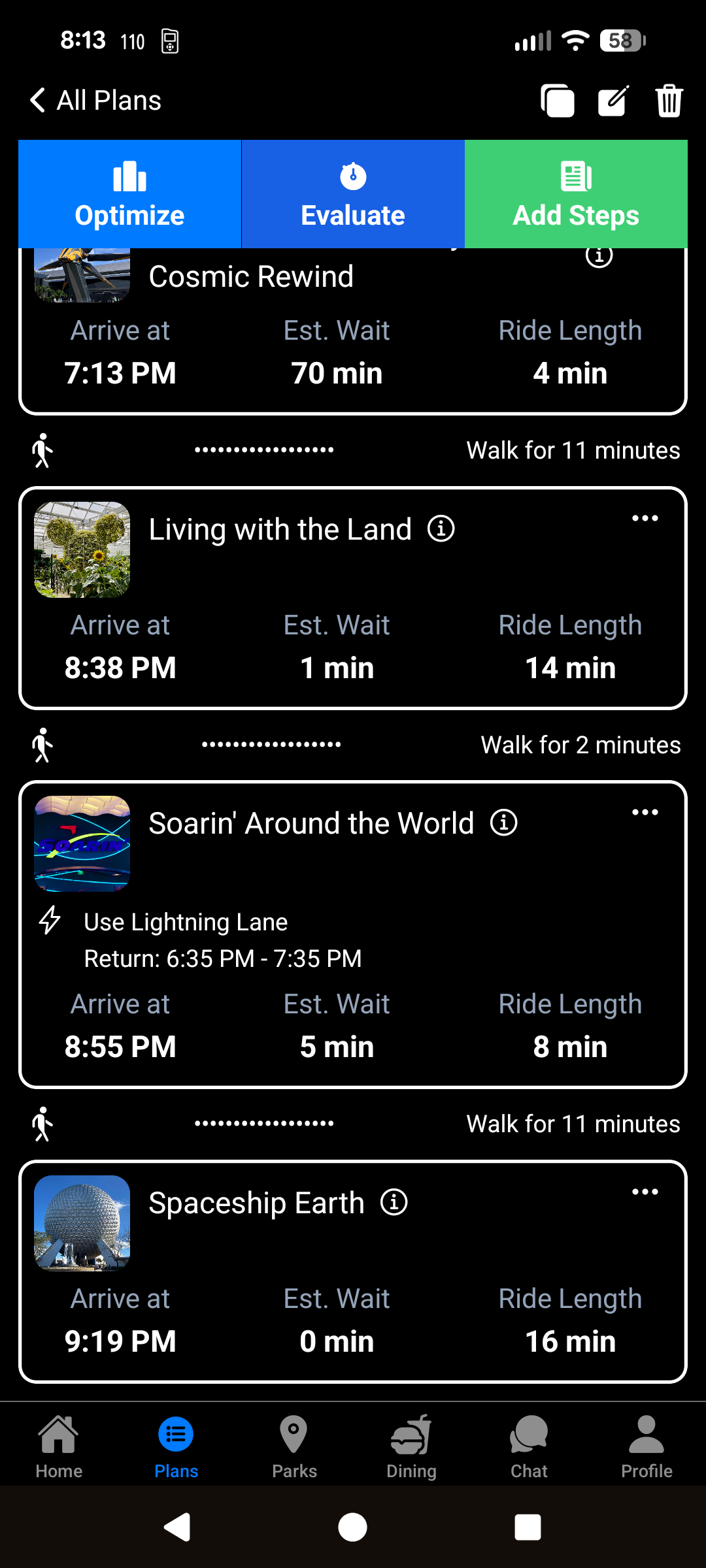
Both of our tests didn’t use the LL for Spaceship Earth, where the TP puts it last on the way out of the park and has the LL earlier so it doesn’t get used. Could be a coincidence…
Neither TP starts at park open. I find it really interesting that your three LLs start at 6:05 (park arrival at 5), whereas my three started at 9:35 (park arrival at 9:30).
I’m going to try a different park and/or using default park hours and see if the behavior changes.
The software is optimized to minimize waiting. One can imagine that a zero minute wait is better than a 5-minute wait with LL in the software’s eyes, even though a human might opt for the former if it is more convenient or if riding later would put it at risk of being missed. I suspect this is what’s going on here.
I ran a quick Hollywood Studios test, with standard 9am opening time.
The LLs are 9:05 (Tier 1), 9:35, and 10:05 (Tier 2s). Interestingly, the 10:05 Tier 2 (ToT) has an arrival in the plan of 12:13pm (which still works because the default grace period in the app is 90 minutes, but the LL is offset).
I’m wondering if Epcot is a little special, as in:
There aren’t a lot of Tier 2 attractions that save much time
The optimizer puts the Tier 1 first, and those are usually a good way into the park (we both used FEA as the Tier 1). I had “minimize walking” set, so that means bypassing Spaceship Earth and hitting it on the way back out.
Does the Optimizer use a priority list? Maybe that’s why it chose SSE instead of LwtL? Or it just didn’t have a good choice for a second Tier 2 to put near the beginning of the TP?
I reoptimized with a grace period of 15 minutes. The LLs stayed the same, but the ordering changed to move ToT to 10:48 (pushed RotR later). The plan was shorter by 8 minutes but had 4 more minutes of walking.
Sure, but I think I assumed that the software would be plotting out the day (e.g. with a minimize walking optimized path) and then applying LL times to the longest wait, or otherwise analyzing through the day when LLs might be, whereas what seems to be happening is that the LL times by the optimizer are always set to the same times based on plan start, regardless of whether that makes the most sense.
There’s an interesting discussion here as to whether you need all three LLs early in the day (versus one to unlock Tiers, be ready for drops, etc.). Could there be some logic from earlier times, where you had to use all 3 passes in order to get more?
I am trying to work out a best strategy. I have two parks days in August. We will do AK morning, EP evening (with deluxe evening hours) one day, and HS morning, MK evening (with deluxe evening hours) the other day. Using LLSP and LLMP, we can minimize our time out in the heat. But I don’t think it makes sense to use LLMP at AK, so I figure I would use it for Epcot to ensure I can book Soarin’ at 7 days out.
I’m not really thinking you would have an issue with booking Soarin’ same day, especially if you tapped in pretty early at AK to open parks. But I also understand wanting to be sure. You could optimize, delete the broken LL for SSE, manually set a valid time for SSE, and reoptimize?
I usually only optimize to get the initial plan and then evaluate / handcraft my LLs, so this is a really interesting issue for me - if I could trust the optimizer more for LLs, it would mean less fiddling / quicker crafting of plans. I really appreciate you pointing this out because it’s been fascinating to test!
I ran a test at AK (fewer LLs, no tiers).
Plan start 9:30. LLs at 9:35 / 10:05 / 10:45
The 10:45 doesn’t match the pattern. Interestingly, the plan tells me to Obtain Lighting Lane for EE at 10:29 am (with ar return time of 10:45-11:45 am). That shouldn’t be necessary under LLMP. And then it has me use the 10:05 LL for KS at 11:14 (so outside the initial hour) for kind of no reason - if it had set EE for 10:05 and KS for 10:45 instead of vice versa, it would not have had to use the grace period.
Soarin’ is actually the reason we booked this trip…to make sure we get to see Soarin’ Across America, which is only a limited time thing, so I think demand will go up for the ride. I don’t want to chance it. Although, standby is always an option, particularly with Deluxe hours available.
Here’s how the optimizer works in a scenario where it’s asked to make LLMP recommendations:
We need to suggest both in-advance LLs and then some number of same-day LLs to get
The same-day LL strategy depends on the specific in-advance LLs we suggest, and the time at which they’re used.
So that means we have to have some idea of the in-advance LLs first
The strategy for suggesting the in-advance LLs has two parts:
Identify the attractions in the plan for which LLs are generally the most useful, based on historical data
Recommend those LLs as early as possible, so you can get same-day LLs faster
Why do we do it this way? Because answering the “in-advance” and “same-day” LL questions simulateously is itself a difficult problem, on top of the difficult scheduling problem.
In some scenarios, like the one @ryan1 is seeing, it means one of the in-advance LL recommendations isn’t used. I don’t have a good solution for this yet, but I’m working on it.
One workaround in the meantime is to run this in two passes. Run the plan through the first time and enter into the plan the LLMPs that it uses. Then run it a second time and see what the recommendations are.
Wait times typically dwarf walking times. The big issue is that LL optimization by itself is a complicated enough problem that it can’t, right now, be done at the same time as basic the tour time problem.

 You could optimize, delete the broken LL for SSE, manually set a valid time for SSE, and reoptimize?