We’re working with our designer to add maps to the Lines app. We envision two primary uses:
To display wait times across the park in map form instead of in a list
To display point-to-point walking paths in the park
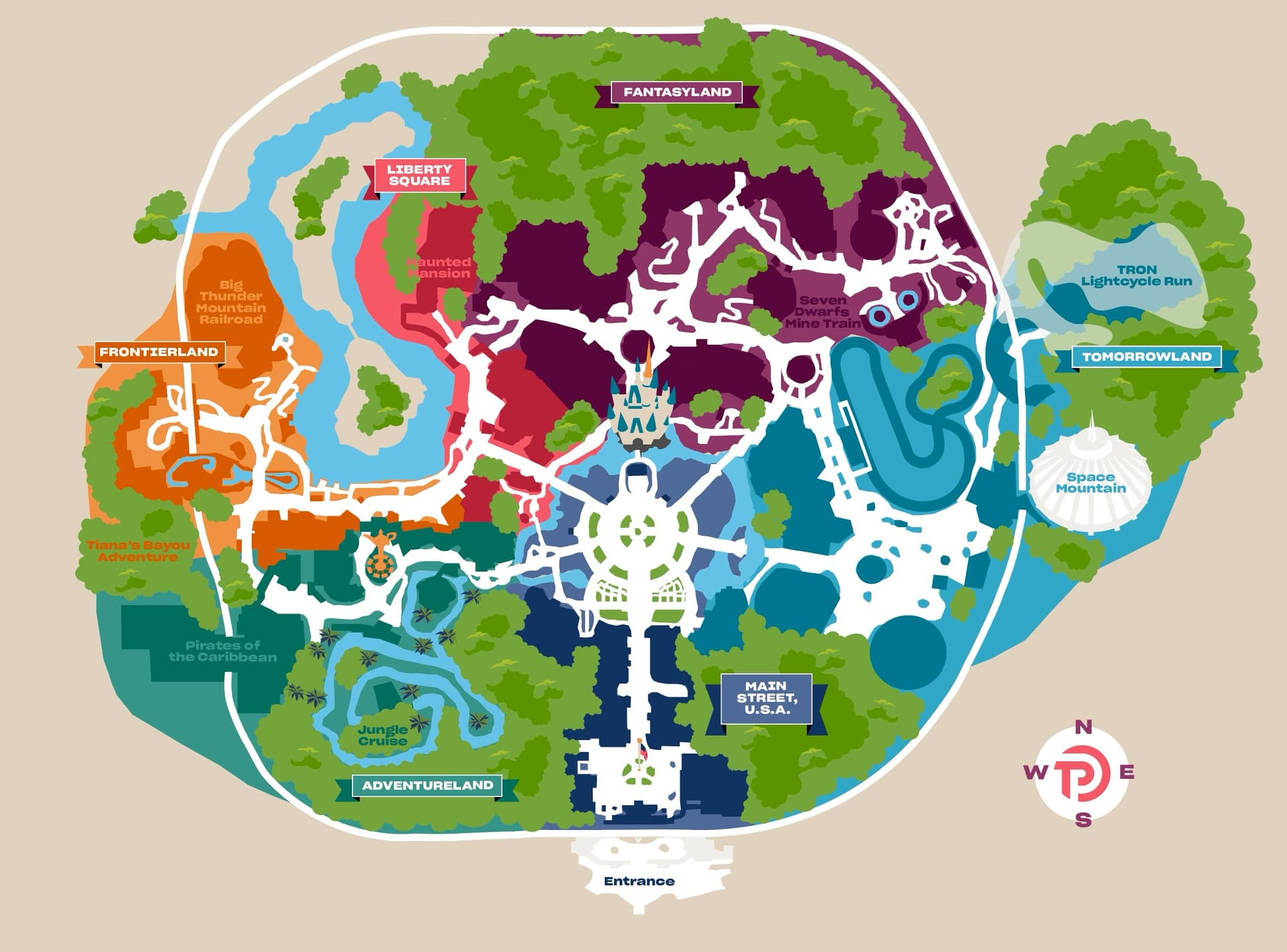
The map below is a very early version for the MK.
We’d like your feedback on it.
A couple of things I’m specifically concerned with, for guests who are not familiar with the parks:
If you’ve never been to the park, we need to be able to give you some sort of visual indication of what you’re near, so you feel comfortable that we know where you are in the park.
As you’re following the walking directions we give you, we need to show you some landmarks you’re passing so that you know you’re on the right path.
I think this could be really helpful, especially to show the entrance vs. exit of a ride which isn’t always apparent on Disney’s map but can make a big difference for certain rides. Is that what you envision, that the start point will be the ride exit, and the end point is the entrance to the next ride?
I’m not sure about the green tree shapes. A lot of those are backstage buildings, not trees, so if someone was looking for greenery they wouldn’t find it. I don’t mind the way you have it on the website map where it is grayed out (IIRC).
One thing I would love to see in a map is for it to change orientation based on the direction you are walking, like Waze does when you are driving. That’s not the way that MDE does it, and is very disorienting. Many times I’ve walked in one direction, thinking I’m going the correct way, and find out I’ve walked in the freaking wrong direction.
In regards to you are here how about the whole map is slightly washed out in colour and only the circle representing current location is in full colour this stops the arrow/pin etc blocking the map.
My initial reaction is that this is a huge improvement from TP’s old maps! Yet I like that it is not too stylized like Disney’s official maps. It’s a good balance.
Personally I would find this very readable and useful, even if (I imagine) I wasn’t as familiar with WDW as I am.
I love looking at maps when making touring plans to visually see how well the sequence flows, and these look fantastic to me - definitely more visually appealing than the current ones!
I like the level of detail with major attraction names and little icons. It’s unclear to me where some of the small paths lead.
I like the idea of somehow adding information on entrance/exit locations (which can be hard to find if you don’t know the park), but also recognize this could make things look overly complicated. Is there a way to show/hide that layer as needed? I would have also loved to see locations for stroller parking back when we still relied on strollers (I used to scour satellite maps to find stroller parking before 7DMT and FoP rope drops where a few seconds can make a difference!)
Any chance you’ll also be doing UOR? It’s harder for me to assess WDW maps now that I’m so familiar with the parks, but I’m in the process of planning our family’s first UOR trip this June, and would be happy to test UOR visuals if that would help!
To add another layer of noise, could this be a toggle? I nearly always know what direction I’m walking and in what direction my goal is. The re-orientation of some nav-aid maps counter to North being up, is disorienting. Most Disney maps seemed not to know that. One park had north at the bottom of the map.
My favorite park maps have always been from EasyWDW. RIP Josh. The maps at the bottom of the touring plans are similar to those but need more identifying information for a map reading challenged person like myself. I don’t need trees or decoration, just clear labels on the attraction/ building instead of a key.
I would hope you still keep the list as an option.
Suggestions:
With the way things change so much seasonally I wouldnt put anything that refers to something that would change unless you plan to update it seasonally.
Sounds like you aren’t going to use Location tracking so maybe store names should be included in finding where the person starts.
Stroller parking, ride entrances, and ride exits all sound like great ideas.
A toggle to add restrooms as a stopping point in the directions.
Have a google maps link that gives walking directions to the actual ride entrance
A Photo of the entrance from the direction you are walking pointing out where Lightning lane and Standby are located.
Visual Landmarks, I love graphic designs but honestly for navigation I need to know exactly what I’m looking for. Say, Look for the castle and walk that way, or look for Tron and walk forward to the right.
Locations of pop up attractions and characters that frequently appear (Such as meet and greets that dont have a formal location). Locations of great photo spots or less known things. Would be a great feature for subscriber access.
Best locations for parades and shows for various scenarios
Really like the map to be interactive during planning phase, so you could drop a pin somewhere in-between activities for a break area or a custom location stop like to fill water bottles or something.
Be able to create pins for custom locations for events or attractions or photo spots.
Agreed - I recently took some basic ADA website design training at work, and some of the ride labels could use more contrast in my opinion (plus the overlaid greens / blues blur together for me especially in the Tomorrowland area - I would simplify everything around the edge of guest accessible park).
More detail / outlines around the edges of attractions and restaurants would be helpful in my opinion for navigation also. Maybe you could select something and it would show its name?
I might put the “You Are Here” label above the pin (and make the pin a little narrower) so that you can see where the pin is pointing better.
I guess on the sample path, I might suggest labeling landmarks like CHH / Sleepy Hollow (or Hall of Presidents), maybe the Tomorrowland bridge arch, and Peoplemover or Astro Orbiter? Is it possible to label all potential landmarks but only show ones within a certain distance of the path?
I have to say that the MDE map is one of its better features for me, although obviously it does not have the benefit of TP actual wait predictions.
ETA: +1 for photos of entrances (and single rider entrances!), visual landmarks, restrooms (with reviews!), parade routes / viewing locations
That is how the MDE app does it. Trees essentially represent areas guests can’t access.
Anyhow, looking at this map design versus the MDE design, and frankly, the MDE design is far superior. The detail it has makes it very easy to understand where you are on the map and what you would be looking at around you. The TP one feels very cartoony with very little detail. The text labels for some of the attractions are very difficult to see. The only way I could see myself using this map versus the MDE one would be simply to see the wait times for all of the attractions (as MDE does), but using the TP estimated actual wait times instead. (The one major thing I hate about the MDE map is that if you zoom in to look at the map/wait times, and then it refreshes, it automatically zooms back out! Why, Disney, why?!?)
This TP map is more focused on lands than it is attractions. But, in practice, I think most people are more interested in locating attractions within the lands, rather than the lands themselves. I might go, “I want to ride Big Thunder”, rather than, “I want to head to Frontierland.” So, a map design that makes it more clear where attractions are is more important than unifying a land by color in my opinion.
The point-to-point walking path is likely useful for those new to the parks (can you include estimated walking times for those?)…and I THOUGHT you could do that in MDE as well, but maybe I’m misremembering. I know the parks so well these days that it isn’t something I need. Or maybe I’m confusing it with being a feature of Google Maps itself.
It could be handy as well to be able to list things “along the way”. In the example image, the path from BTMRR to Space Mountain, it might be handy if there was a list of attractions, restrooms, and eateries that you might pass along that route. So, like, I might go, “I need to stop at a restroom on the way” or something might go, “Can we grab a bite to eat on the way?” That kind of thing.
I wonder if linking out to Google Maps (or embedding them somehow?) might be possible. I also remembered the same and it was really helpful for orientation / navigation. Why reinvent?
(To answer my own question - because not everyone will have Google Maps…)
I think Google Maps is available to anyone with a smart phone.
I’m not sure if Apple Maps also provides the same functionality…but if so, perhaps there would be a means to link to Apple Maps from the Iphone version of the app, and Google Maps from Android. But, like, my wife has an iPhone and uses Google Maps.
 We’d like your feedback on it.


 I just checked.