Trying to build a touring plan (MK 5/9 Crowd Level 5). I have input my ILLs and LLMPs, but I don’t know what to do about the LLs I will grab as I go. I don’t know what will be available, and when. Do I just make my best guess? Also, I purposely got an 8am Buzz so I can try to grab a headliner (TBA) but the tool has me using it at the end of the window. I assume I should just override that?
This is the part of building touring plans that I find the most challenging. Maybe there’s an easier way, but the way I typically do it is a bit labor intensive. Basically, I will research the historical trends and I will watch the lightning lane availability in the weeks/months leading up to my trip.
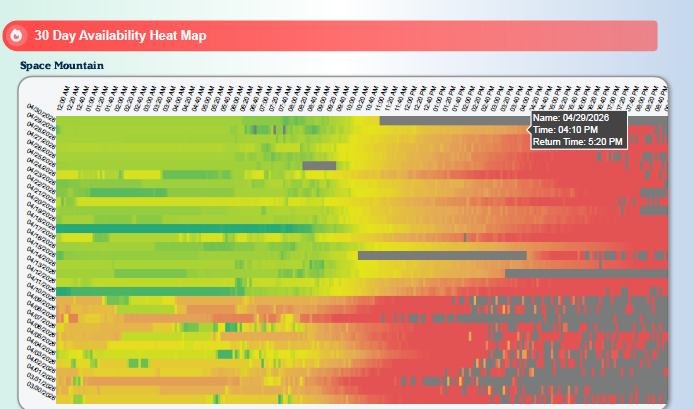
Thrill data has heat maps for each attraction that show the available LL return times at any specific point in the day for the last 30 days (I used to be able to also see this information for any past date going back a couple of years or so, but it looks like they must have recently changed that to a paid subscriber benefit because when I tried to look at it today, I got a message saying I needed to be a Thrill Data Plus subscriber to see it). So for example, if I know that I will be eligible to book a lightning lane at 4:00 based on my touring plan, I hover over that time in the heat map on a specific day, and it will show what the earliest available LL return time was at that point on that day. I try to choose days with similar characteristics as the day I will be attending (for example, day of the week, special events like EEH, etc).
Also, I will watch LL availability in real time using BG1 or Thrill data. So using the same example, at 4:00 each day or every few days in the period leading up to my trip, I’ll go in and look at what LL times are currently showing as available and make a note of that so I can know what to expect and arrange my touring plan accordingly.
This is obviously quite a bit of work, but as a hyper planner, I feel like it’s what I need to do because “winging it” just isn’t in my nature. I do wish there was an easier/more automated way to do it though.
Wow, impressive, thank you! I have kind of been doing this on a simpler level by watching the LL return times in the days leading up to the trip. This may not matter too much, but on my MK day, the hours are unusually long for the season (8-11) with the 2nd parade, so I wonder how that will affect availability.
But I am glad to hear I am not alone in this issue, and that generally, I am on the right track with my research.
I do find after laying out plans for the big rides/must-dos I am more inclined to just group a bunch together at certain times and maybe skip ones that are too long of a wait (for example, barnstormer, Dumbo, the car ride, teacups) because I don’t have the discipline to line them all up perfectly and try to predict what kind of LL I can get by say, 8pm. I try to plan all of the rides but lose my way easily.
Isn’t everything in a touring plan a best guess? Some of the factors that are being weighed have a higher confidence than other factors, but they are all a best guess.
Consider the following: How do you know today that the plan you have created will give you the best result if a thunderstorm happens on 5/9/26 at 2:00 PM and an attraction you have not yet ridden goes down for the rest of the day? With any significant confidence, you don’t.
Keep in mind that not every LL return time you may get on day-of will be advantageous to your overall experience, given your situation at the time you obtain it. So you can:
Use your intuition, make your best guess and either keep it or try for another LL that might be better for you.
Take your plan (with completed steps marked as Done) and make a copy. In the copy add in the new LL return time, run the Optimizer and decide if that LL provides a better result for you. If it doesn’t, delete the copy. If it does add the LL return time to your plan and Optimize to make it current.
It’s up to you to determine how much effort you want to expended and if it will be worth it to you .
Good advice. As a new user of the tool, I forgot about optimizing in the park. I am so used to doing all of my planning up front (with the ability to adapt in the park, of course.) Thanks.
I didn’t know if the tool had a way to do this predicting for me and I just wasn’t using it properly.
Yes, I will be very flexible the day of, but it would be nice to start with a solid plan that makes sense, so I was just making sure I was doing that to the best of my abilities.
Hi aemery1, one other tip – if you delete your LLMP reservations from the Touring Plan and then hit optimize, it will give you recs for what times to make LL reservations throughout the day, including for LL reservations after you pre-booked 3.
From the bigger picture perspective, I think there’s two good uses for TouringPlans, and they’re a bit different:
Pre-trip: Optimizing and evaluating is a great way to get a loose, default agenda for your day, and also to see if your plan is realistic. (I.E., can I realistically fit all of these rides/shows/meals into the time I have available.) It’s helpful to figure out your rough agenda this way, but I always prepare to be flexible since things can change so easily day of.
During Trip: Optimize the plan as you go to see what makes sense to do next based on real time data. You don’t have to do this constantly or anything. (Though it’s an easy thing to do when you’re waiting in line.) But will give you more actionable and up-to-date guidance on how to make the most of your day.
Just be careful! The optimizing tool will sometimes radically change your entire plan just to save like 6 minutes. I prefer the “evaluate” button as it will update your plan, even while in the park, with the current waits without rearranging anything. The app may tell you, “you’re not going to be able to do all your planned attractions.” However, most of the time you’ll be fine.
Make a plan,optimize it a day or two before you leave, then follow that plan in the parks. I rarely even “evaluate” my plans in the park any more. The TPs I make before the trip are usually pretty accurate with me actually “getting ahead” more often because the LL times are better than predicted.
Len has said after the new update you should at least optimize as the park opens. It will be able to pull the info on the attractions that are not opening. I think this would be especially important for HS? Evaluating pulling the updated info is new to me. I wonder if I missed that.
This is all so interesting to me, I’ve been a TP member for years and years and haven’t used the tool bc I found it confusing. I have an upcoming trip and I’d like to use it as I see the benefit. I just need a lesson!! Is playing around with it the best way to figure it out or is the functionality explained somewhere? Thank you so much in advance
I would create a couple of plans. The website is much easier to use. Also, play with dome of the advanced features/settings since you have been following here!
“When you use our Evaluate feature, it will keep all of your steps in the order that you place them while updating wait and walking times. It’s very useful, but what may happen is you may visit an attraction that is showing as closed or have an attraction that is closed for that day. Then the feature does not know what to do.
You can try optimizing your touring plan, to put the steps in the most efficient plan.”
It will update snd mark closed but will not adjust for closed /delayed attractions?